Amazon Virtual Multipacks: The Post-Launch Audit
Keep, Reprice or Delete the Listings Amazon Made for You
Amazon created multipack listings from selected FBA brand owners’ singles, priced them at unit price times quantity, and put them on sale on 11 November 2026. This guide is the audit you run now: the per-unit fee maths the launch coverage skipped, one decision per pack - with delete treated as the one-way door it is - and how to track sales your reports are hiding. Updated November 2026.
Introduction
This guide is for brand owners whose FBA products Amazon selected for the virtual multipack pilot. It is not for everyone, and you can find out whether it is for you in about two minutes: go to Manage All Inventory in Seller Central and filter your SKUs for VMP_. Every virtual multipack Amazon created carries that prefix. If the filter comes back empty, Amazon has not built any packs from your products in this wave — you can skip to Section 5, because the multipack-versus-bundle confusion in there catches out sellers with no VMPs at all. If rows come back, keep reading: those listings went on sale on 11 November 2026, at prices Amazon chose, whether you reviewed them or not.

What Amazon did, in one paragraph. For selected FBA brand-owned ASINs with strong multi-unit demand, Amazon created brand-new listings that sell two or more units of your single-pack product as one offer — a 2-pack, a 3-pack — fulfilled by picking that many single units from the FBA stock you already have there. Each pack has its own ASIN, its own SKU, a title and description Amazon wrote, and a default price set at your per-unit list price multiplied by the pack size. There was no opt-in. The listings were created by 28 October, you had until 10 November to review, edit or delete them, and everything you left in place went live. Amazon says the pilot runs through 2027, so this wave will not be the last.
Most of the coverage so far was written for that review window, and the window has closed. This guide is the other half of the job: the post-launch audit. Your packs are selling now, at prices you may never have run the numbers on, drawing stock faster than your order counts suggest, and recording their sales in a way most of your reports do not show. For each pack, there are exactly three decisions — keep it, reprice it, or delete it — and one of those decisions cannot be undone during the pilot. This guide works through the fee maths the launch coverage skipped, the decision for each pack, how to track sales your reports are hiding, and the programme confusion (multipack, virtual bundle, bundle policy) that is already causing sellers to make the wrong call.
One honesty note before the detail. Amazon's own notice and help page sit behind the Seller Central login, so the mechanics below come from those pages as reported by the seller press that read them — Nova, SellerSonar, 595 Agency, Starren and others, cross-checked against each other on 17 November 2026 and listed in the Sources. Where sources agree, this guide states the fact plainly. Where a claim rests on a single seller report, it is labelled as one. Verify the specifics in your own Seller Central before you act on them; the audit itself takes an afternoon.
In 60 seconds: the audit on one screen
- Amazon built the listings. Virtual multipacks are new ASINs with VMP_ SKUs, created by Amazon for selected FBA brand-owned products, live since 11 November 2026, pilot running through 2027. No opt-in exists, and FBM offers are not included — if you sell the same product both ways, only the FBA offer can carry a pack.
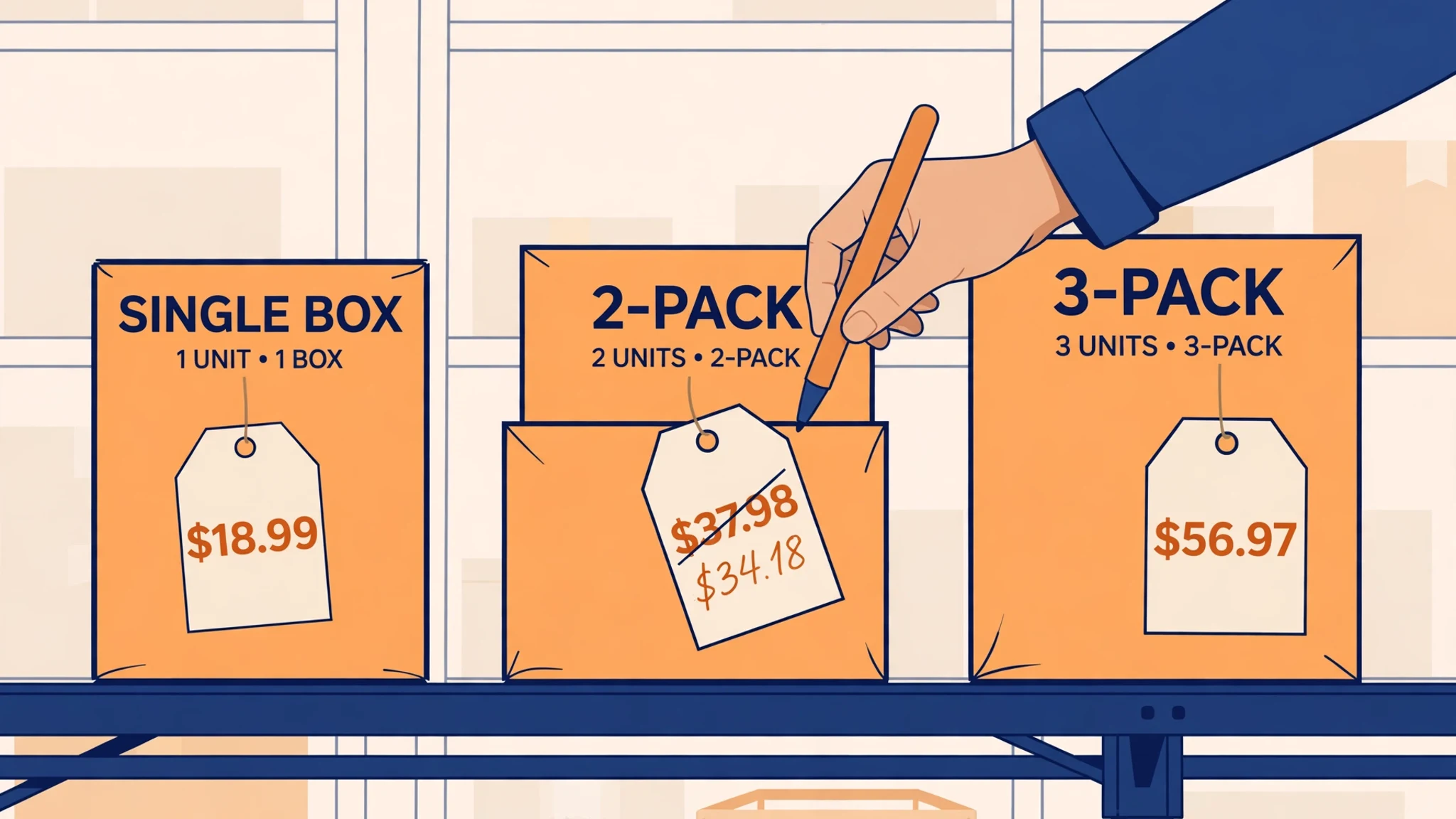
- The default price is unit price × quantity — a 2-pack of an $18.99 single launched at $37.98 — and it follows your single-pack price when that changes. The buyer gets no bulk saving at the default, and any discount you add comes straight out of your margin.
- The fees are per underlying unit. There is no programme fee, but a 2-pack pays two FBA fulfilment fees, a 3-pack pays three, and the referral fee is charged on the total pack price. "Unit price × 2" is therefore not the margin of a physical 2-pack — Section 2 works the numbers.
- Delete is a one-way door. You can edit a live pack's price, title and description — only through the Edit virtual multipack page, never through flat files or the API, which can break the listing — and you cannot change the pack size at all. A pack you delete cannot be reactivated during the pilot.
- Your reports are hiding the sales. Multipack sales do not appear in most Seller Central reports; a pack sale is recorded as separate sales of each single unit. Track by the VMP_ SKU and by units-per-order instead (Section 4).
- A multipack is not a bundle. It is several units of one ASIN. Amazon's January 2027 bundle policy expressly excludes multipacks — do not delete packs out of bundle-policy fear (Section 5).
1. What Amazon created — and the default pricing trap
Start with what is actually sitting in your catalogue, because the details decide the audit.
The listing. Each virtual multipack is a separate offer with its own ASIN and a SKU that starts with VMP_ and shows the pack size — you will see forms like VMP_…2_PK. Amazon writes the title (expect something plain like "Pack of 2") and the description, building both from your single-pack page. The pack appears as a variation of the single pack in the variation selector. If your single pack had no variation family, Amazon creates one — which means the grouping of your detail page may have changed even if you never touch the pack itself. Give a new listing about 48 hours to look complete before judging its content; early screenshots of half-built pages caused some of the launch-week alarm.
The selection. Amazon picked the ASINs with an automated process, looking for products buyers already purchase in multiples — consumables, refills, household staples, anything on a reorder cycle. You cannot apply, and you cannot opt a product out of eligibility in advance; your only controls are the edit and delete buttons on each pack Amazon creates. The pilot is a US programme: the notice did not name a marketplace, and the help page sellers are working from is the US store's.
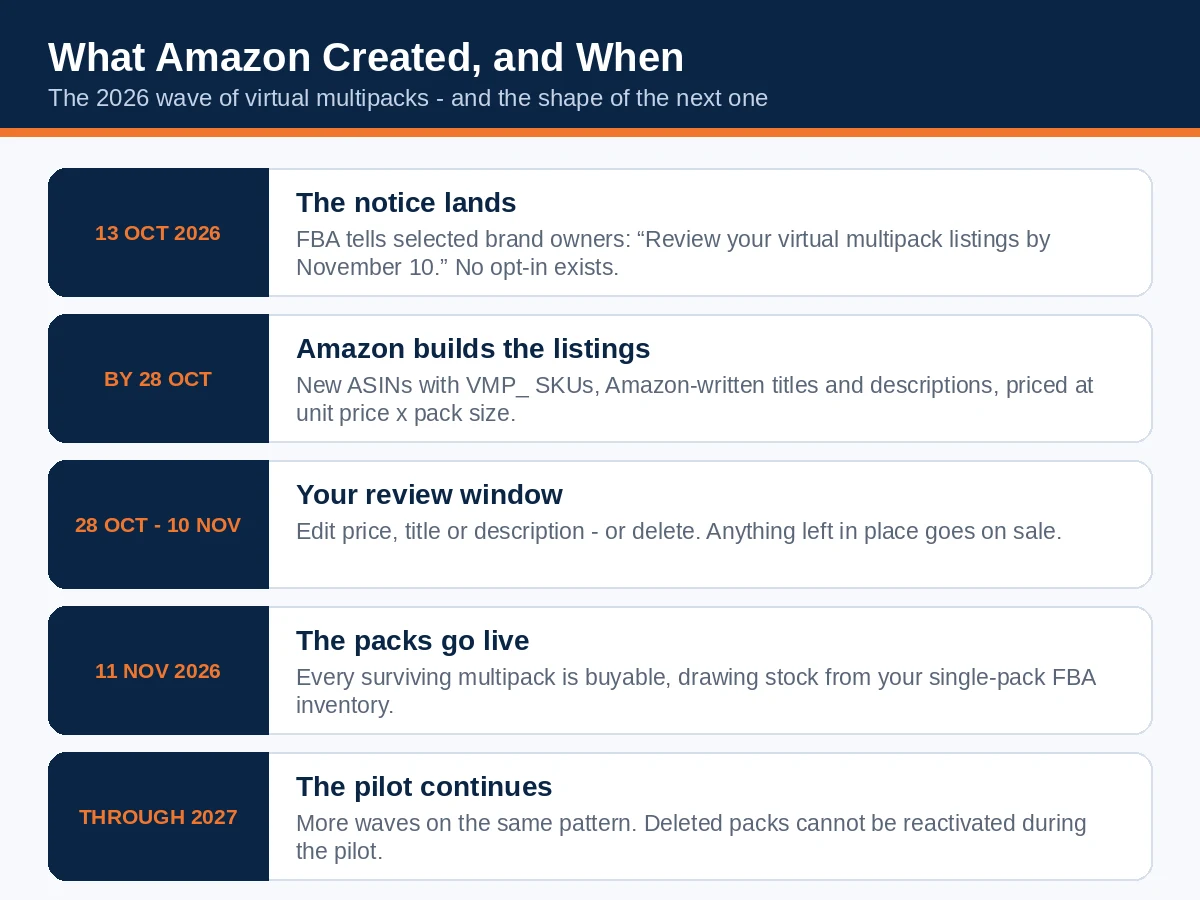
The timeline of this wave is worth fixing in your head, because the next wave will follow the same shape:
| Date | What happened |
|---|---|
| 13 October 2026 | FBA notice reaches selected sellers: "Review your virtual multipack listings by November 10" |
| By 28 October 2026 | Amazon creates all of this wave's multipack listings |
| 28 October – 10 November 2026 | Review window: edit or delete each pack before it sells |
| 11 November 2026 | Every pack not deleted goes on sale |
| Through 2027 | Pilot continues; further waves expected on the same pattern |
This was not the first wave, either. Sellers were discussing a pilot group in October 2025, and a wave created on 27 July 2026 went live on 10 August. If you had no VMPs this time, the two-minute filter check belongs in your routine anyway — the checklist that comes with this guide builds it in.
The default pricing trap. The pack's launch price is your current per-unit list price multiplied by the pack size, and it is not a one-off setting: when your single-pack price moves, the pack price follows it, unless you have set your own price or a multipack-only percentage discount on the pack. Three consequences follow. First, at the default the shopper has no financial reason to choose the pack — three singles cost exactly what the 3-pack costs — so a pack left at default is selling convenience only. Second, the price Amazon chose may collide with the rest of your business: a pack price that undercuts your own website, a retail partner, or a MAP commitment is a channel problem you did not create but now own. Third — the one this guide spends a section on — the default looks like the margin of the physical multipacks you may already sell, and it is not, because the fee structure underneath it is different.
What you can and cannot change. On a live pack you can edit the price, title and description — but only on the Edit virtual multipack page in Seller Central. Amazon warns that edits made through other listing pages, flat-file templates, the API or third-party tools can break the listing, and sellers who manage catalogues by spreadsheet need to hear that plainly: keep VMP_ SKUs out of your bulk uploads. What you cannot change is the pack size. A 3-pack of a product shoppers only ever buy singly will still be a 3-pack after every edit — for that pack, the real choice is reprice or delete. And one duplication check before you decide anything: if you already sell your own physical multipack at the same count, you now have two near-identical offers splitting reviews, ad spend and shopper attention. That overlap is a decision input in Section 3.
2. The fee maths: why "unit price × 2" is not the same margin
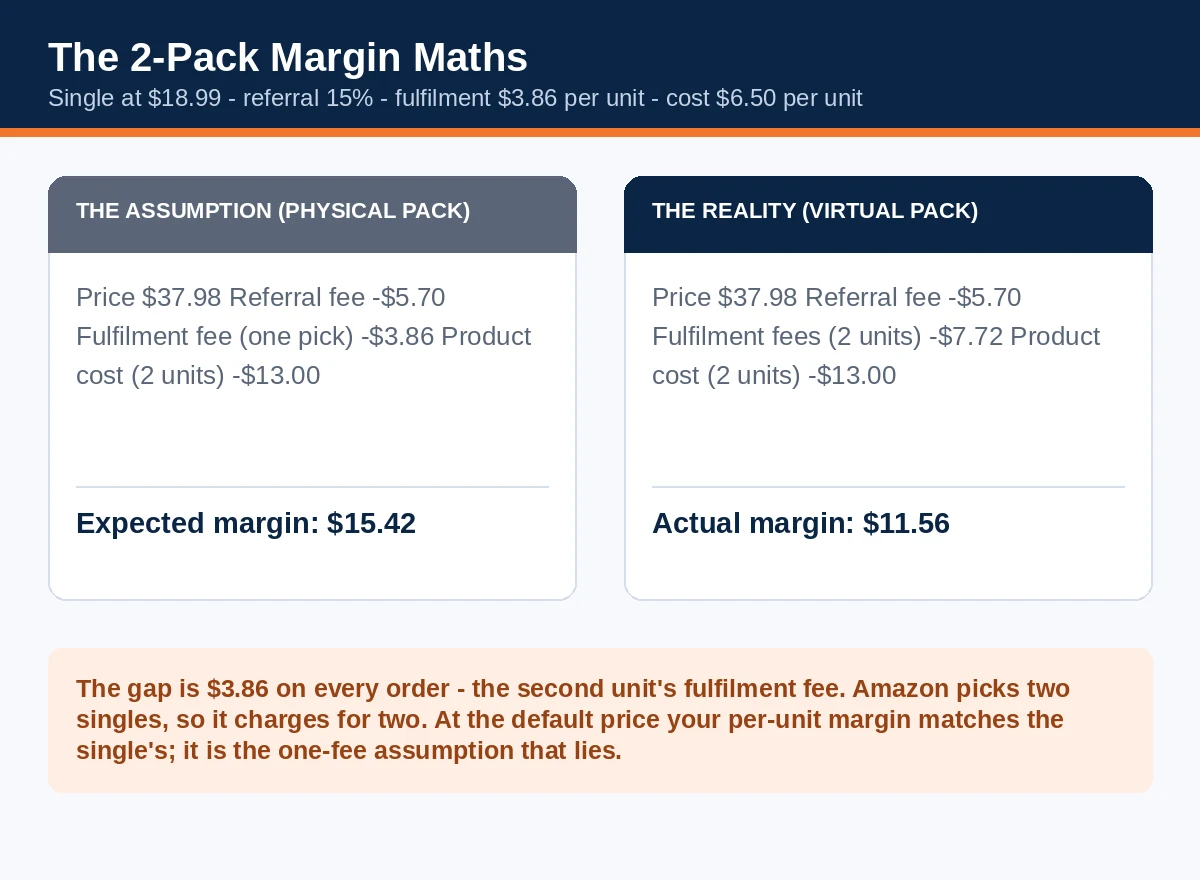
Here is the misunderstanding to clear first, because it is the one with money attached. If you sell a physical 2-pack — two units kitted into one sellable item, one barcode, one FNSKU — Amazon picks one item and charges one fulfilment fee. A virtual 2-pack is not that. Amazon picks two single units, and the fulfilment fee is charged per underlying unit: two picks, two fees. SellerSprite's fee summary, carried by 595 Agency, is explicit — no fee to create or keep a virtual multipack, fulfilment charged per unit, referral fee charged on the total sale price — and MarketplaceOfficer's deadline calendar says the same in one line: a two-pack incurs two single-unit fulfilment fees.
So run the numbers properly. Take a representative single: $18.99 price, 15% referral fee, an illustrative $3.86 FBA fulfilment fee per unit, and $6.50 product cost per unit. Your real fees will differ — rebuild this with your own Fee Preview numbers, which is exactly what the worksheet with this guide is for — but the shape of the result is the same for every product.
The single, for reference: $18.99 − $2.85 referral − $3.86 fulfilment − $6.50 cost = $5.78 margin (30.4%).
The 2-pack at Amazon's default price of $37.98: referral is 15% of the total, $5.70. Fulfilment is 2 × $3.86 = $7.72. Product cost is 2 × $6.50 = $13.00. Margin: $37.98 − $5.70 − $7.72 − $13.00 = $11.56 — exactly twice the single's margin. Read that twice, because it cuts both ways. The good news: at the default price, Amazon has not taken a margin cut; your per-unit margin is untouched. The trap is the expectation: a seller who budgets the pack like a physical multipack — one fulfilment fee — expects $37.98 − $5.70 − $3.86 − $13.00 = $15.42, and overstates the margin by $3.86 on every single order, the second unit's fulfilment fee. On a pack doing 200 orders a month, that is $772 of margin that exists in the spreadsheet and nowhere else. EcomCrew's published worked example lands in the same place: a $36 offer carrying $8 of fulfilment charges — two units' worth — before referral, ads and other costs.
The 3-pack at the default $56.97: referral $8.55, fulfilment 3 × $3.86 = $11.58, cost $19.50, margin $17.34 — three times the single, same per-unit story.
Now the discounts, because "just add 10% off" is where the money actually leaks:
| Offer | Price | Referral (15%) | Fulfilment | Product cost | Margin | Margin per unit |
|---|---|---|---|---|---|---|
| Single | $18.99 | $2.85 | $3.86 | $6.50 | $5.78 | $5.78 |
| 2-pack, default | $37.98 | $5.70 | $7.72 | $13.00 | $11.56 | $5.78 |
| 2-pack, 5% off | $36.08 | $5.41 | $7.72 | $13.00 | $9.95 | $4.98 |
| 2-pack, 10% off | $34.18 | $5.13 | $7.72 | $13.00 | $8.33 | $4.17 |
| 3-pack, default | $56.97 | $8.55 | $11.58 | $19.50 | $17.34 | $5.78 |
| 3-pack, 5% off | $54.12 | $8.12 | $11.58 | $19.50 | $14.92 | $4.97 |
Two lessons from the table. First, a discount on a pack is not cheaper to give than a discount on a single — there is no fulfilment saving underneath it to absorb the cut, the way there is when a shopper buys a kitted multipack or a Subscribe & Save bundle of shipments. Every point of pack discount comes out of the same per-unit margin you earn on singles. A 10% discount on the 2-pack hands back $1.61 of margin on every unit in it. Second, the discount only earns its keep if the pack converts buyers who would not otherwise have bought two or three units — a reorder-cycle shopper stocking up, a gift buyer, a household that gets through one unit a fortnight. If the pack mostly serves people who were already buying multiples, you have paid a discount for orders you already had. That is a testable question, and Section 4 shows you the number that answers it: units per order, before and after.
None of this makes the packs a bad deal. A pack that raises units per order spreads one product-page visit, one ad click and one acquisition cost across two or three units, and it costs you nothing in prep, packaging or inbound freight to stand up. It makes them a priced deal: keep the default where the pack sells on convenience, discount deliberately where you are buying genuinely incremental volume, and never let a spreadsheet with one fulfilment fee per pack tell you the margin is better than it is.
3. Keep, reprice or delete: the pack-by-pack audit
Work through your VMP_ list one pack at a time, with the worksheet open. For each pack there are four checks, then one decision.
Check 1 — the content is accurate. Amazon generated the title and description from your single-pack page, and generation is where quantity errors breed. Count what one sellable unit of your product actually contains, multiply by the pack size, and compare that number against the pack's title, its description, its images and the variation selector. If one unit of your product is itself a box of six sponges, a virtual 2-pack delivers twelve — and every piece of copy on the page has to say so. A pack whose count reads wrong anywhere is a "not as described" return being loaded; fix the title and description on the Edit virtual multipack page before you judge anything else about the pack. While you are on the detail page, look at the single pack's images too. Sellers in the announcement thread reported a multipack image appearing as the main image on the single-pack listing. That is a seller report, not something Amazon has confirmed — treat it as a reason to look, not as a known bug.
Check 2 — the price fits your business. Put the pack's current price next to three numbers: the default (single price × pack size), your price for the same count anywhere else you sell it, and any MAP or channel commitment the pack might undercut. A pack tracking your single's price will also inherit your single's price mistakes — if the single is mid-promotion or mid-price-war, the pack is too.
Check 3 — the margin survives. Rebuild Section 2's table with your real numbers: referral on the full pack price, fulfilment per underlying unit, product cost per unit. Note the margin at the current price and at 5% and 10% discounts. The worksheet does this arithmetic for you; the decision needs the numbers in front of you, not a feeling.
Check 4 — the demand is real. Amazon selected these ASINs because buyers already buy multiples, but verify it on your own data: Business Reports, Detail Page Sales and Traffic by Child Item, last 90 days — divide Units Ordered by Total Order Items for the single pack. A ratio meaningfully above 1.0 (the newsletter method uses 1.2 as a working signal) says the pack size matches behaviour. Discard any ratio built on one bulk order; a single wholesale buyer makes any product look like a multipack candidate.
Then decide:
| Decision | When it is right | What to do |
|---|---|---|
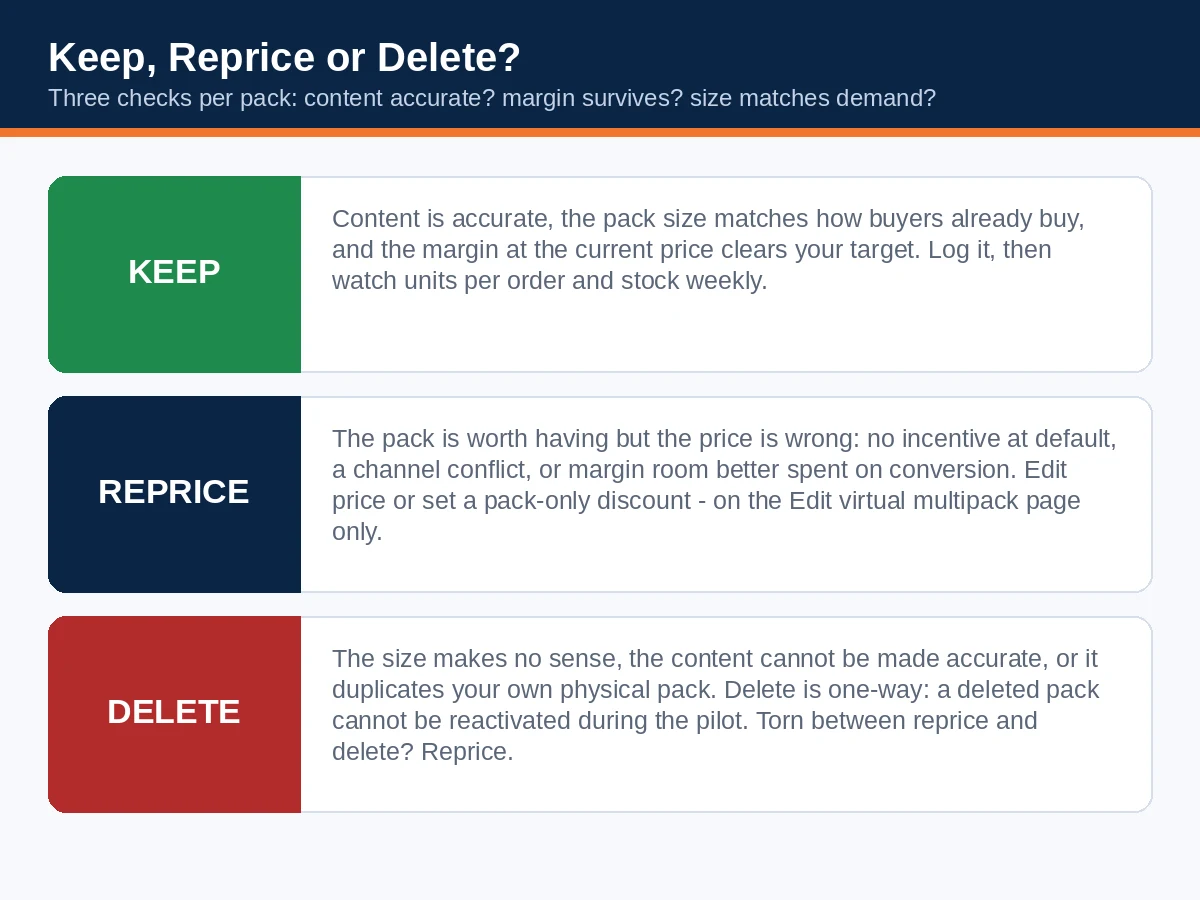
| Keep | Content accurate, pack size matches real buying behaviour, margin at the current price clears your target | Leave the price; log the pack in the worksheet; watch units per order and stock weekly |
| Reprice | The pack is worth having but the price is wrong — no incentive at default, a channel conflict, or margin room you would rather spend on conversion | Set your price or a multipack-only percentage discount on the Edit virtual multipack page; re-check the margin at the new price first |
| Delete | The pack size makes no sense for the product (a single is already a multi-month supply), the content cannot be made accurate, it duplicates your own physical pack at the same count, or the price conflict cannot be fixed by repricing | Delete from the row menu in Manage All Inventory — knowing it cannot come back during the pilot |
Weigh delete properly. During the pilot, a deleted virtual multipack cannot be reactivated — Amazon's help page, as reported by Nova and others, is plain about it, and deletion in an earlier wave was likewise described as permanent. Nobody can tell you today whether deleted packs return when the pilot ends or in a later wave; that is genuinely unstated. So treat delete as a decision for the whole pilot, not a tidy-up. The practical rule: if you are torn between reprice and delete, reprice. A pack repriced to a level you can live with keeps the option alive while you gather a month of units-per-order data; a deleted pack gives you no data and no way back. Save delete for packs you would not want at any price — the absurd pack size, the unfixable content, the head-on collision with your own physical multipack.
One more discovery from the field, via SellerSonar: sellers are finding these ASINs through their monitoring tools first, and the first guess is usually hijacking, a duplicate listing or a suppressed-listing problem. Before you escalate an unfamiliar ASIN as a catalogue attack, check whether it is tied to one of your FBA singles and follows pack-count logic. A new ASIN nobody on your team created is now, quite often, just Amazon.
4. Tracking sales the reports miss
The least visible part of this programme is the scoreboard. Per Amazon's help page as reported by SellerSonar and Starren, virtual multipack sales do not appear in most Seller Central reports at this time — and when a customer buys a multipack, the sale is recorded as separate sales of each single unit in it. Your Business Reports will show the units; they will not show you a clean multipack line, a multipack conversion rate, or a multipack ASIN to optimise against. Sellers waiting for a tidy report before judging their packs will wait a long time. Track it manually instead, four ways:
1. Keep a pack register. The moment you find VMP_ rows, log each one — pack ASIN and SKU, the single it is built from, pack size, current price, your decision — in one place. The worksheet with this guide is built for exactly this. When the next wave lands, the register is how you notice new rows instead of re-auditing your whole catalogue from memory.
2. Read units per order, not orders. On the single pack's child-item report, Units Ordered ÷ Total Order Items is the pack's fingerprint. If the ratio climbs after 11 November while your single's traffic is flat, the packs are pulling volume; if it does not move, the packs are decoration. It is also your discount test from Section 2: a discount that does not move units per order is a donation.
3. Forecast stock in units. Orders lie about consumption now. A day of 60 single orders plus 40 two-pack orders is 100 orders and 140 units out of the same pool — a forecast built on order count understates demand by 40 units (EcomCrew's example, and the arithmetic is unforgiving). Heading into Black Friday on 27 November, plan replenishment on units. Remember the coupling: the multipack draws from the single's stock, so a stockout on the single takes the pack off the detail page with it until you restock.
4. Reconcile the first real orders. When pack orders land, pull the transaction detail and check the fees against your worksheet: referral on the full pack price, one fulfilment fee per underlying unit. If the charged fees match the model, your margin table is trustworthy for every later decision. If they do not, you have learned something Amazon's summaries did not tell you — write it in the register. In the same pass, watch the single pack's return reasons for a week or two: a new run of "not as described" or quantity complaints is the pack-count content problem from Section 3 surfacing in the only place it reliably shows.
None of this is elegant, and it may improve — reporting gaps in a pilot often close. Until they do, the sellers who know what their packs earn are the ones keeping the spreadsheet.

5. Not a bundle: virtual multipacks vs virtual bundles vs the January policy
Ask a room of sellers what a virtual multipack is and half of them will describe a virtual bundle. The two programmes share a surname and a fulfilment trick — nothing is physically packed; Amazon picks existing FBA stock — and differ in almost everything else. Because our Article 7 is an exit plan for Amazon's bundle policy deadline of 11 January 2027, this is also where sellers are most likely to make an expensive mistake: deleting multipacks out of bundle-policy fear, or assuming a multipack somehow answers a bundle problem. It does neither.
| Virtual multipack (VMP) | Virtual bundle | |
|---|---|---|
| What it combines | 2+ units of the same ASIN | 2–5 different, complementary ASINs of one brand |
| Who creates it | Amazon, on the seller's behalf, during the pilot | You, manually, in the Virtual Bundles tool |
| How you get it | Selected by Amazon; no opt-in | Brand Representative or Authorised Reseller role in Brand Registry, Professional plan |
| Listing identity | New ASIN and VMP_ SKU; a variation on the single-pack page | Its own bundle detail page |
| Price | Defaults to unit price × pack size; follows the single's price; optional pack-only discount | Set by you; must not exceed the sum of the components' prices |
| Inventory | Your single-pack FBA stock, drawn per unit | Each component ASIN's FBA stock |
| Editing | Edit virtual multipack page only; pack size fixed; delete is final during the pilot | Editable and removable by you in the tool |
| Reporting | Sales missing from most reports; recorded as single-unit sales | Sales also largely absent from standard reports, attributed differently |
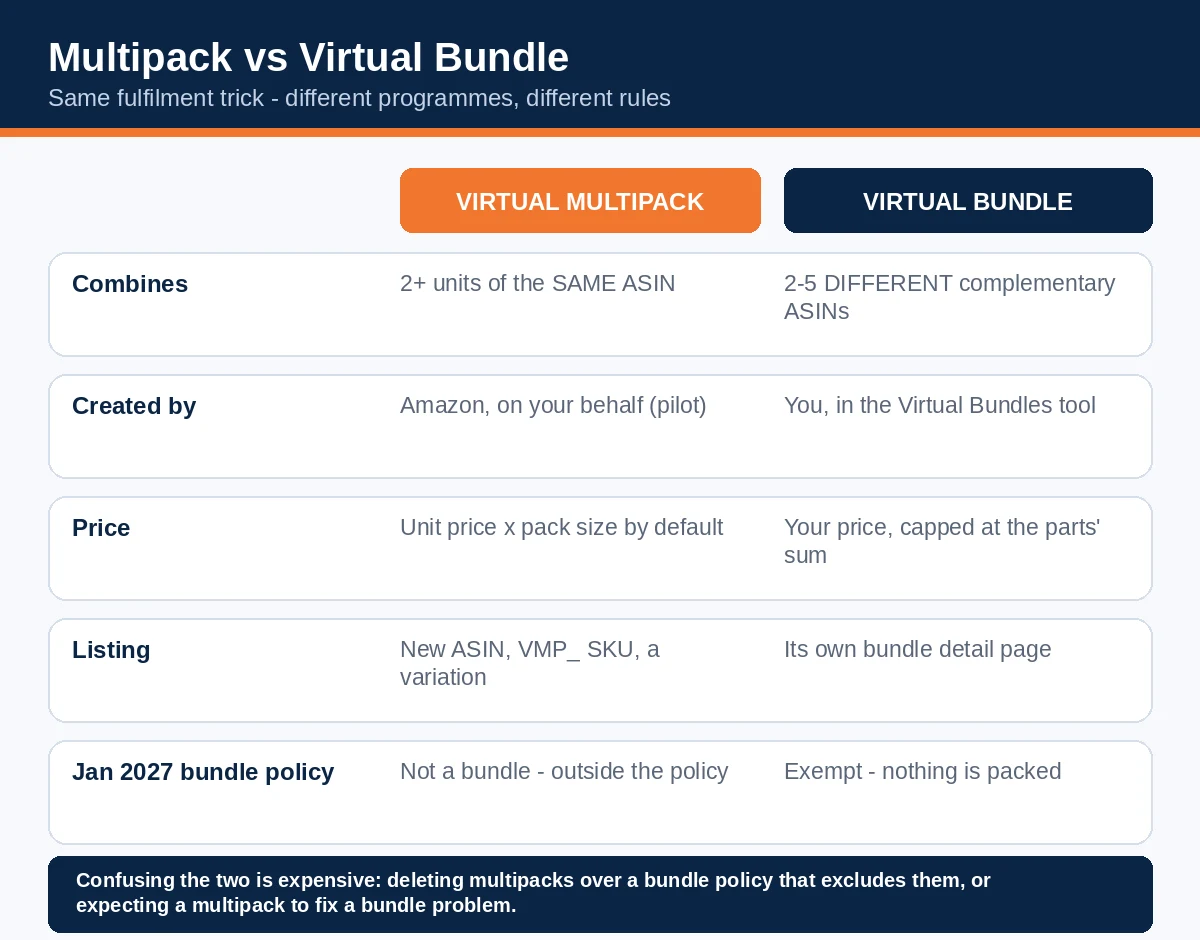
And the third leg: the bundle policy itself. From 11 January 2027, most product bundles sold as a single ASIN must be packaged by the original manufacturer or brand — the rule our exit-plan guide works through. Amazon's policy text draws the line explicitly: bundles do not include multipacks, which consist of two or more identical products, and an Amazon moderator confirmed in the announcement thread that multiples of one product are a multipack governed by the ASIN Creation Policy, not the bundling policy. Virtual bundles escape the January rule for a different reason — nothing is physically packaged at all. Virtual multipacks were never inside it: they are an Amazon-created mechanism, not a seller bundling strategy, and not a workaround for the rule.
The practical consequences, stated flatly:
- Do not delete a virtual multipack because of the January deadline. The deadline is not about it.
- Do not count a virtual multipack as bundle cover. If you sell physical bundles of different products, they still need their own exit route — manufacturer packaging, a letter of authorisation, virtual-bundle conversion, sell-through or removal — by 11 January.
- *Mind your own physical multipacks separately. The ASIN Creation Policy says sellers should not list non-standard multipacks that are not created by the brand owner or manufacturer. That sentence is about packs you* create, not Amazon's VMPs — but if your catalogue carries third-party multipacks you assembled yourself, that is a live question for your catalogue, and it belongs in the same audit week.
Frequently asked questions
Listings I never created appeared in my account. Have I been hijacked?
Almost certainly not. Filter Manage All Inventory for VMP_. If the unfamiliar ASINs carry that prefix, sit as variations on your own FBA singles and follow pack-count logic, they are Amazon's virtual multipacks. Investigate an unknown ASIN properly only if it is unrelated to your catalogue or its content does not match your product.
Can I opt in to get multipacks, or opt out of the programme?
Neither. Amazon selects the ASINs with an automated process; there is no application and no eligibility opt-out. Your control is per-pack: edit the price, title and description, or delete the pack.
Can I change a pack's size — turn a 3-pack into a 2-pack?
No. Pack size is fixed at creation. If the size itself is the problem, your choices are to price it as it is or delete it, keeping in mind deletion cannot be undone during the pilot.
I deleted a multipack by mistake. Can I get it back?
Not during the pilot. Amazon's help page, as reported by Nova and others, says a deleted virtual multipack cannot be reactivated while the pilot runs. Whether deleted packs can return after the pilot has not been stated — which is why this guide treats delete as the last resort, not the tidy-up.
How do I edit a multipack safely?
Only through the Edit virtual multipack page in Seller Central. Edits pushed through other listing pages, flat-file templates, the API or third-party tools can break the listing. Keep VMP_ SKUs out of bulk uploads, and allow a new listing around 48 hours to finish building before you judge or edit its content.
What does a multipack sale actually cost me in fees?
There is no programme fee. On each order you pay the referral fee on the total pack price, plus one FBA fulfilment fee per underlying unit — two fees on a 2-pack, three on a 3-pack. Section 2 works the full example; the short version is that your per-unit margin at the default price matches the single's, and any pack discount comes straight off it.
Where do my multipack sales show up in reports?
Mostly, they don't. Amazon records a multipack sale as separate sales of each single unit, and multipack sales are absent from most Seller Central reports for now. Track the VMP_ SKUs directly and read units per order on the single pack (Section 4).
Does the 11 January 2027 bundle policy force me to remove these?
No. Amazon's bundling policy expressly excludes multipacks of identical products; the January rule governs bundles of different products sold as one ASIN. Your physical bundles still need an exit plan — your virtual multipacks are not part of that problem, and not a solution to it either.
Will the pack show reviews?
The pack is a new ASIN sitting inside your single's variation family. TrackIQ reports that a new multipack ASIN starts with no reviews of its own; Amazon has not stated the rating-display handling in the sources for this guide, so open your own detail page and check how the stars present for the pack before you spend ads against it.
What happens to the pack if my single pack sells out?
Because the pack draws from the single's inventory, the multipack disappears from the detail page while the single is out of stock and returns when you restock (SellerSprite, via 595 Agency). Forecast in units, not orders, so the pack does not drain the single into a stockout neither of you planned.
Is this running outside the US?
The programme documented here is the US pilot: the seller notice did not name a marketplace, and the help page is the US store's. If you sell in other stores, check your own Seller Central for a local notice rather than assuming this wave's dates apply.
Over to you
The audit itself is an afternoon: filter for VMP_, check each pack's content against what a buyer actually receives, rebuild its margin with per-unit fulfilment fees, look at your units per order, and write down one decision per pack — keep, reprice, or delete, with delete reserved for packs you would not want back at any price this pilot. The worksheet and checklist that come with this guide carry the worked example and the routine, including the two-minute VMP_ check to repeat whenever a new wave lands — and with Black Friday on 27 November, the stock half of the audit (units, not orders) is the part to finish first.
Amazon has started writing listings into seller catalogues and giving sellers a window to object. The sellers who come out of this pilot ahead will not be the ones who deleted everything in protest or kept everything on autopilot; they will be the ones who priced the packs Amazon made as if they had made them themselves.
Read next
- Amazon's Bundle Policy, 11 January 2027: The Exit Plan for Seller-Assembled Bundles (2027 Guide) — the other January-shaped problem in your catalogue: which physical bundles can stay, which need a letter of authorisation, and which need an exit before the deadline. Multipacks are excluded from that policy — your bundles of different products are not.
- Amazon Vine for Sellers: Cost, Eligibility, and Whether It's Worth It (2027 Guide) — the other programme where Amazon hands brand owners a ready-made mechanism and the real work is the maths: fees, free units, and the break-even test before you commit.
Multipacks are safe from the January deadline. Your physical bundles are not.
From 11 January 2027, most bundles sold as one ASIN must be manufacturer-packaged. The exit plan works through which of yours can stay, which need a letter of authorisation, and which need an exit - while there is still time to choose.