The Returns Double Hit
Amazon’s Frequently Returned Badge, the Returns Processing Fee, and How to Bring Your Return Rate Down
One number — your trailing three-month return rate, judged against your category — now punishes you twice: a red warning banner on your product page, and a per-unit fee on the returns above your threshold. This guide explains how both work, where to see your rate before Amazon acts on it, and the diagnosis that fixes the cause instead of the symptom. Updated November 2026.
Introduction
This guide is for FBA sellers — the badge and the fee both grow out of Amazon-handled returns — and for hybrid sellers with meaningful FBA volume. If you fulfil everything yourself, Amazon doesn't charge you a returns processing fee (you pay for returns in your own postage and time instead), but the badge logic still matters: it is driven by your product's return rate, not by who shipped it, and the diagnosis method in Sections 4 and 5 works for any fulfilment method.
A high return rate used to be a private problem: a margin leak you noticed in your own spreadsheets, in your own time. Amazon has turned it into a public one, twice over. First, the "Frequently returned item" badge — a dark red warning banner on your product page, under your star rating, telling shoppers to think twice. Second, the returns processing fee — a per-unit charge on the returns above your category's threshold, quietly deducted months after the sales that caused it.
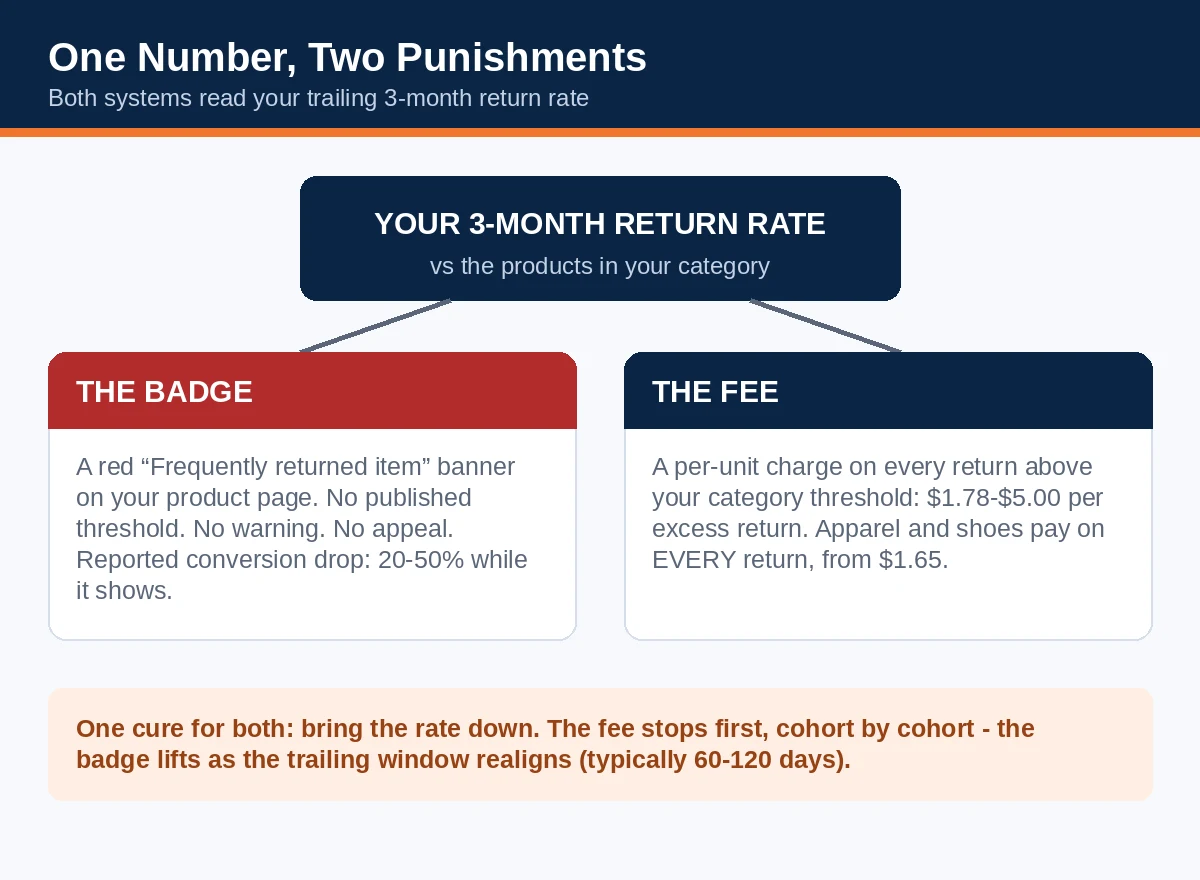
They are not two separate problems. They are two punishments reading the same number — your trailing three-month return rate, judged against the other products in your category. Which means they also share one cure. Sellers who fix the return rate lose the fee first and the badge second; sellers who fight the badge and the fee separately, with appeals that don't exist and discounts that don't help, keep both.
This guide explains how each punishment actually works — including the important detail that one of them has no published threshold at all — where to find your real numbers before Amazon finds them for you, how to diagnose returns by the reason buyers actually give, what recovery honestly takes (weeks of arithmetic, not days of effort), and how to work out whether a chronically returned product is worth fixing or worth cutting.
In 60 seconds: the double hit on one screen
- One signal: both systems read your trailing 3-month return rate — the units returned across a three-month window, divided by the units shipped in the first month of that window — and judge it against your category.
- The badge: a red "Frequently returned item" banner on your detail page when your customer-initiated return rate runs significantly above similar products. Amazon publishes no numeric threshold for it, sends no warning before it appears, and offers no appeal. It removes automatically when your rate comes back in line — sellers typically report wearing it for 60–120 days.
- The fee: FBA returns above your category's published threshold are charged per unit from a dedicated rate card (in force since 15 January 2026): $1.78–$5.00 per excess return for standard sizes. Thresholds run from 2.9% (Grocery) to 12.8% (Backpacks, Handbags and Luggage). Apparel and shoes have no threshold at all — every return is charged, on a lower card starting at $1.65.
- The early warning exists: the Voice of the Customer dashboard shows your 3-month return rate next to Amazon's suggested rate for the category, and flags ASINs "At Risk" before the badge lands. Sixty seconds there tells you where you stand.
- The damage: sellers and agencies consistently report conversion drops of roughly 20–50% while the badge shows (traffic holds up; orders don't), plus the fee, plus refund administration — one costing of a $29.99 product put a sellable return at $10.52 beyond the refund, and an unsellable one at $19.69.
- The fix is diagnostic, not cosmetic: read the return reasons, fix the top one or two causes in the listing, the product or the packaging, and let the three-month window carry the improvement through.
1. One number, two punishments — cousins, not twins
Start with the shared arithmetic, because both systems are built on it. Amazon measures return rate by cohort: take the units you shipped in a given month, then count the returns of those units that arrive over the following three months, and divide. A product that shipped 1,000 units in March and took back 140 of them across March, April and May has a 14% return rate on that cohort — even if most of those returns landed in May, long after the March sales reports were closed and forgotten.
Against that number, the two systems judge differently, and the difference matters:
The fee is a rule. Every category has a published threshold. Stay at or below it and the fee is zero. Rise above it and you pay the rate-card fee on each return above the threshold quantity — not on every return. The numbers are knowable in advance, which means the fee is plannable: you can compute your exposure today, to the dollar (Section 3 shows how).
The badge is a judgement. Amazon's own seller guidance describes a machine-learning comparison: your product's customer-initiated return rate set against similar products — similar in type, department and price — with delivery problems and fraudulent returns excluded from the rate it uses. There is no published percentage that triggers it. The threshold tables circulating on seller blogs (including, honestly, the one in Section 3 of this guide) are the fee thresholds, reused as a proxy because they are the only category numbers Amazon publishes. They are a good proxy — the fee line and the badge line clearly live in the same neighbourhood — but a proxy is what they are. A product can be badged below its fee threshold if its direct competitors return less, and the only instruments that show your badge risk directly are Amazon's own: the Voice of the Customer dashboard and the badge itself.
The two at a glance:
| The badge | The fee | |
|---|---|---|
| Trigger | Return rate significantly above similar products (machine-learning comparison) | Return rate above your category's published threshold |
| Threshold published? | No — Voice of the Customer's suggested rate is the gauge | Yes — 2.9% to 12.8% by category |
| Warning before it lands | No notification; the "At Risk" flag in Voice of the Customer is the only heads-up | No warning needed — your exposure is computable in advance |
| Appeal | None exists | Nothing to appeal; the maths is the maths |
| How it ends | Automatically, when your rate realigns with similar products | Automatically, cohort by cohort, as your rate falls |
| What it costs | Conversion — a reported 20–50% while it shows | $1.78–$5.00 per excess return (apparel: every return, from $1.65) |
One more shared trait, and it's the cruel one: lag. Returns arrive weeks after purchases; the measurement window is three months; the fee is deducted in the third month following shipment. Every part of this system runs about a quarter behind reality. The returns causing your problem this quarter were generated by the listing, product and packaging decisions of last quarter — and the fixes you make today will not fully show in the number for roughly three months either. Sellers who don't understand the lag conclude their fixes don't work and abandon them in week three. Sellers who do understand it fix once, properly, and wait out the arithmetic.
2. The badge: a warning label you can't appeal
What shoppers see. A dark red banner on the product detail page, directly below the star rating — above the fold, next to the purchase decision — reading: "Frequently returned item. Check the product details and customer reviews to learn more." On some listings the warning carries a reason drawn from the return data ("due to tight fit", "due to poor fit"). Amazon made the badge significantly more prominent in early 2026 and expanded it across more categories from 16 February 2026; what was once a line of small print is now the loudest element on the page after the price.
How it lands. Automatically, by algorithm, with no human review — and, sellers report, with no notification before it appears. One morning the listing simply has it. There is no appeal, no dispute button, no case type that removes it: Amazon's guidance describes exactly one exit, which is the return rate coming back in line with similar products, at which point the badge is removed automatically. Every hour spent drafting an appeal against this badge is an hour not spent on the only lever that exists.
What it costs. Amazon publishes no impact figures, so treat the numbers in circulation as what they are — consistent seller and agency reporting, not Amazon data. Across those reports, conversion on badged listings falls by roughly 20–50%, typically within the first one to two weeks. The pattern inside the fall is instructive: traffic stays roughly flat (the badge doesn't remove you from search), orders drop, and then ranking follows the lost sales down. The badge doesn't suppress your listing; it persuades your visitors, one by one, not to buy — and lets the algorithm do the rest.
The good news buried in the mechanics. Because the badge is comparative and rate-driven, it has a genuine off-switch, and Amazon gives you the instrument panel: the Voice of the Customer dashboard lists badged ASINs, flags ASINs At Risk, and shows your 3-month return rate beside a suggested return rate for the category. An At Risk flag is the warning the badge itself never gives you. A seller who checks Voice of the Customer weekly should never be surprised by this badge — and surprise, as Section 6 shows, is most of the cost.
3. The fee: the quiet deduction
History in one paragraph. Before June 2024, returns processing fees existed only in five try-before-you-decide categories: apparel, watches, jewellery, shoes/handbags/sunglasses, and luggage. The June 2024 overhaul extended the fee to every category, with a threshold per category. From 15 January 2026 the fee runs on its own dedicated rate card by size tier and shipping weight — it no longer simply equals the fulfilment fee, a detail much of the older guidance still gets wrong.
How the charge works. For each monthly shipping cohort, Amazon compares the cohort's three-month return rate with your category threshold. Returns up to the threshold are free of this fee; each return above it is charged at the rate-card price for that unit's size and weight. The deduction lands between the 7th and 15th of the third month following shipment — which is why sellers so rarely connect it to the sales that caused it — and it is itemised in the SKU Economics Report.
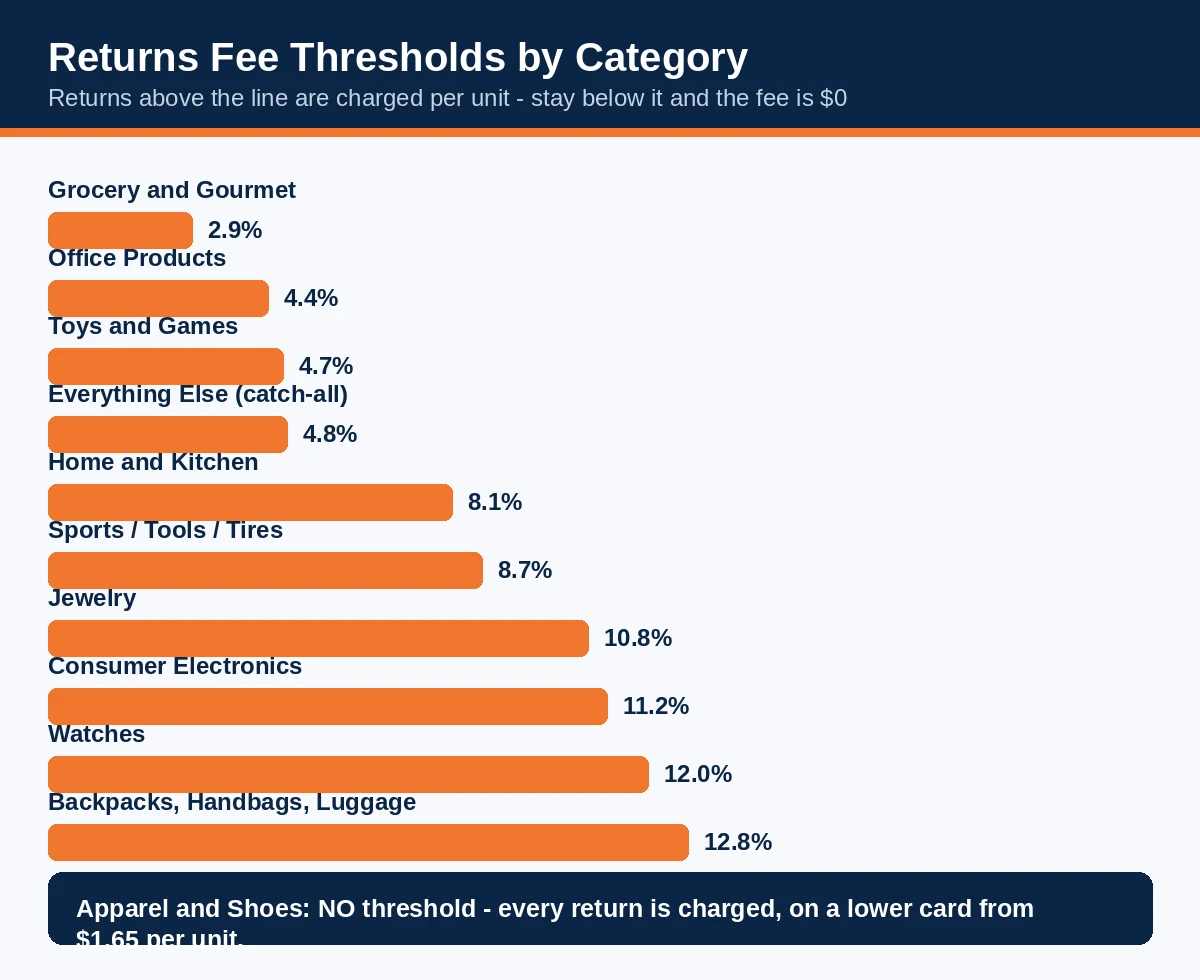
The thresholds that matter most (Amazon's published fee thresholds; the full list runs to 32–33 categories — check yours in Seller Central, because Amazon's page is the only version that binds):
| Category | Fee threshold |
|---|---|
| Grocery and Gourmet | 2.9% |
| Office Products | 4.4% |
| Toys and Games | 4.7% |
| Everything Else (catch-all) | 4.8% |
| Home and Kitchen | 8.1% |
| Sports and Outdoors / Tools and Home Improvement | 8.7% |
| Jewelry | 10.8% |
| Consumer Electronics | 11.2% |
| Watches | 12.0% |
| Backpacks, Handbags and Luggage | 12.8% |
| Apparel and Shoes | No threshold — every return charged |
The rate card, in brief. Standard sizes, non-apparel: $1.78 for a small standard unit of 2 oz or less, rising by weight band to $5.00 for large standard at 3 lb and above (plus $0.05 per 4 oz beyond); bulky items start at $6.74 and extra-large units can run far higher. Apparel and shoes use a separate, lower card — $1.65 at the smallest band to $3.89+ for heavy large standard — but remember, they pay it on every return.
Three exemptions worth knowing before you panic. SKUs shipping fewer than 25 units in a month are exempt for that month, so test-velocity listings don't accrue the fee. New-to-FBA parent ASINs in the FBA New Selection programme get their first 20 returned units waived, provided the returns arrive within 180 days of the first inventory receipt. And returns caused by Amazon's own errors — a lost item, a wrong item shipped from the fulfilment centre, damage in Amazon's hands — don't count toward your return rate or trigger the fee (they are also separately reimbursable, if you claim them). None of these rescues an established ASIN running above threshold, which is most sellers' actual situation — but they explain many a mysteriously zero fee line.
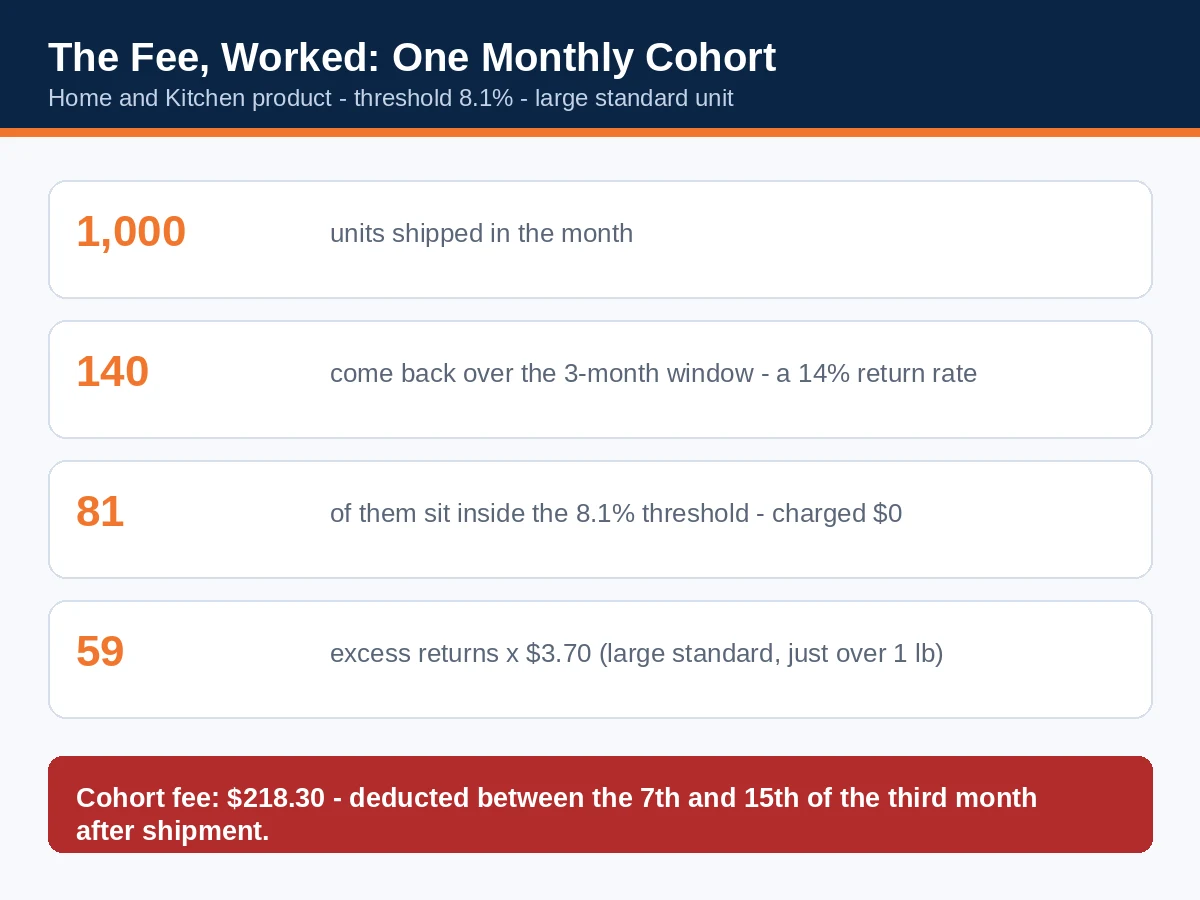
A worked example. A Home and Kitchen product (threshold 8.1%) ships 1,000 units in a month. Across the three-month window, 140 come back — a 14% return rate. The threshold quantity is 81 returns, so 59 excess returns are charged. At the large-standard rate for a unit just over a pound, $3.70 each, the fee for that one cohort is $218.30 — deducted two months later, in a line most sellers never open.
Apparel maths, for contrast. An apparel item shipping 1,000 units at a typical 25% return rate produces 250 returns, all charged. At a mid-band apparel rate of $2.62, that's $655 — not a penalty for crossing a line, but a permanent cost line that belongs in the product's pricing from day one.
And the fee is not the whole cost of a return. A detailed costing published by Sellerboard in August 2026, on a $29.99 large standard product above its threshold, put the full cost of one sellable return at $10.52 beyond the refund — the processing fee, refund administration, and the handling chain — and one unsellable return at $19.69, once the lost unit is counted. When Section 6 asks whether a product is worth keeping, it is these numbers, not the fee alone, that go into the calculation.
4. Find your numbers: the 60-second check and the deep pull
The 60-second check (weekly). Seller Central → Performance → Voice of the Customer. For each ASIN that matters, read two numbers side by side: your 3-Month Return Rate and the Suggested Return Rate Amazon shows for the category. Above the suggested rate, you are in badge territory and (for the fee) likely over threshold; within a point of it, you are one bad month from trouble; comfortably below it, this ASIN is fine and your attention belongs elsewhere. Note the At Risk flags and any ASIN already badged, and glance at the customer comments attached to recent negative experiences — Section 5 turns them into work.
The deep pull (when a number is wrong, and monthly regardless). Three sources, three jobs:
- Voice of the Customer, in depth — 3-month and 12-month return rates (the 12-month view separates a chronic problem from a bad quarter), return reasons and verbatim customer comments per ASIN, and the CX Health trend that shows whether your fixes are registering.
- The FBA returns report (Reports → Fulfilment → FBA Customer Returns) — every returned unit with the buyer's chosen reason and comment, its disposition (sellable, damaged, defective, customer-damaged), and the ASIN/variation it belongs to. This is the file the diagnosis in Section 5 is built from; download 90 days of it.
- The SKU Economics Report — where the returns processing fee actually appears, per SKU, so the fee stops being an estimate and becomes a line you can manage.
- Seller Central's returns reporting (Return Insights) — your current return rate by ASIN set against the category threshold, refreshed several times a week. Set your internal alarm at 80% of your threshold: crossing it gives you roughly a month's working room before fees start triggering on new cohorts.
One measurement warning, straight from Amazon's guidance: the dashboard rates are seller-facing indicators. The badge decision uses matured, fully processed returns and its comparison set, so your dashboard number and Amazon's badging number can differ slightly. Treat the dashboard as an early-warning gauge with a small margin of error — another reason to run a buffer below the suggested rate rather than surfing it.
5. Diagnose by reason: the fix follows the cause
Return rates don't fall because you "improve quality" in the abstract. They fall when the specific reason buyers give most often stops being true. Pull the returns report, group by reason, and work the top of this table:
| What buyers say | What it usually means | The fix that moves it |
|---|---|---|
| Too small / too large / poor fit | Sizing information failed before purchase | Real measurements (not just S/M/L), a size chart image with body measurements, fit notes from returns data ("runs small — size up"), model dimensions on lifestyle images |
| Not as described / doesn't match photos | The listing promised a different product than the box contains | Audit every image and bullet against the physical item; show scale, colour in daylight, what's not included; remove the claim the returns keep quoting |
| Defective / stopped working | A genuine product or batch problem | Batch-level QC sampling, supplier corrective action, check whether defects cluster in one production run or one variation |
| Arrived damaged | Packaging loses to the carrier network | Drop-test honestly, upgrade the failure point (corners, glass, liquids), check "customer damaged" dispositions for frustration damage |
| Wrong item received | Pick/pack or variation-mapping error | Variation audit (is the child ASIN mapped to the right physical variant?), FBA label check, warehouse picking check for FBM |
| Quality not as expected | The price wrote a cheque the materials can't cash | Either upgrade the material/component buyers name, or reposition the listing's claims and price to the product you actually sell |
| No longer needed / ordered by mistake | Mostly not fixable — and mostly not your fault | Confirm it's a minority reason; if it dominates, your targeting/keywords may be attracting the wrong buyer |
| Bought multiple sizes (apparel bracketing) | Shoppers use returns as a fitting room | Better fit information reduces it at the margin; fundamentally, price it in (apparel pays the fee on every return anyway) |
Three diagnostic habits separate sellers who fix this from sellers who fiddle:
- Read the comments, not just the codes. The reason code says "not as described"; the comment says "the blue is much darker than the photo" — one of those is actionable. Verbatim comments in Voice of the Customer and the returns report are the cheapest product research you will ever get.
- Cut by variation before you blame the product. A parent ASIN at 14% is often one child at 30% (one size, one colour, one batch) and the rest at 7%. Fixing or delisting one variation can rescue the parent — and delisting a bad variation is a legitimate, immediate lever, unlike most things in this system.
- Watch the mix, not only the rate. If "defective" is 5% of your returns and "fit" is 45%, a QC programme is a distraction. Work the Pareto top — usually two reasons account for the large majority of returns, and both fixes are usually listing-side, cheap, and fast.

6. The recovery plan — and the keep / fix / cut decision
The order of work. (1) Pull the data and name the top two reasons (an afternoon). (2) Ship the listing fixes — size information, images, claims — because they cost hours and start working on the next order. (3) Ship the product/packaging fixes for whatever the listing can't solve; these take longer and may need a new production run, which is exactly why they start now. (4) Where one variation is poisoning the parent, pause or delist it while it is fixed. (5) Then monitor weekly in Voice of the Customer, expecting the rate to lag the reality by design.
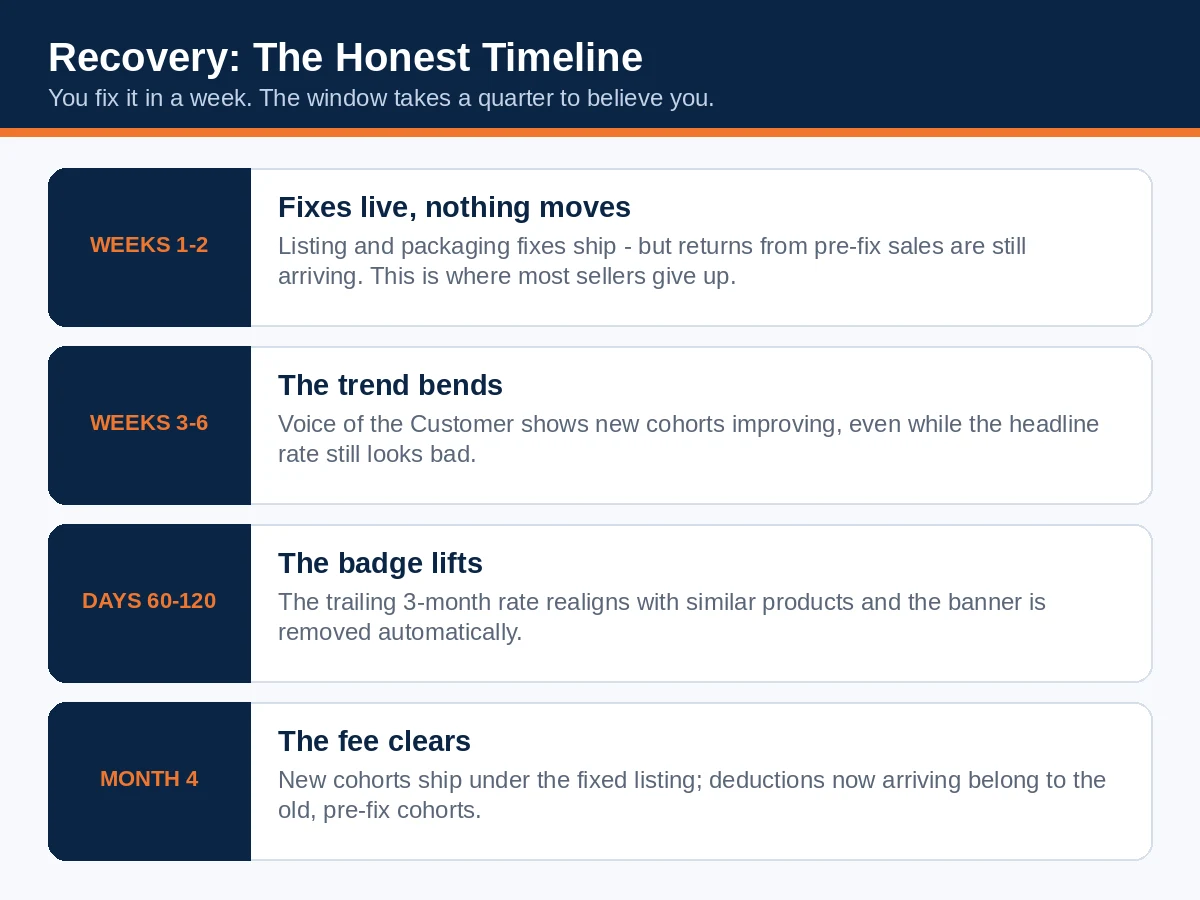
What recovery looks like while it's working. Weeks 1–2: the fixes are live and nothing visibly improves — returns from pre-fix sales are still arriving, and the window hasn't moved. Weeks 3–6: the Voice of the Customer trend bends; new cohorts show the lower rate even though the headline number still looks bad. Days 60–120: the badge lifts when the trailing rate realigns, and the fee stops biting on new cohorts; deductions for old cohorts may still land. The sellers who fail this process mostly fail it in weeks 1–2, by concluding that nothing is happening.
How long recovery honestly takes. Amazon's stated rule is only that the badge removes automatically once the rate is back in line with similar products. The lived experience follows from the arithmetic: because the window is three months and returns lag sales by weeks, a seller who fixes everything today typically carries the badge for a further 60–120 days while the bad cohort ages out — and the fee keeps applying to cohorts shipped before the fix for just as long. Anyone who promises you 30 days is describing the theoretical minimum, not the typical case. Plan cash flow and ad spend around the honest range: conversion is impaired for a quarter, so protect the listing's economics (don't chase the lost conversion with indiscriminate discounting, which buys sales at a worse margin and can attract the wrong-fit buyers who return most), keep the product in stock, and let the window do its work.
Two things not to do. Don't close the listing and relaunch the product under a fresh ASIN to escape the badge: it forfeits your reviews and ranking, the return behaviour follows the product, and deliberately duplicating listings to evade a performance signal invites a policy problem far worse than a badge. And don't try to suppress returns mechanically — discouraging legitimate returns, or making the process adversarial, conflicts with Amazon's returns policies and tends to convert returns into A-to-Z claims and negative feedback, which are worse currencies.
Keep, fix, or cut — the decision. Run the product's real economics with returns inside the margin, using the full cost of a return (Section 3: ~$10.52 sellable / ~$19.69 unsellable on a $29.99 large-standard item above threshold), not just the fee:
- Fix when the top return reasons are listing-side (fit information, description, images) or one variation carries the problem. The product earns; its communication doesn't.
- Fix at the product level when the margin survives the current return cost while you fund a packaging or quality correction — and the correction credibly moves the top reason.
- Cut when the fully-loaded margin is negative at the return rate the product realistically settles at, the top reason is intrinsic (the product category bought speculatively, fit that no chart can rescue), or the badge's conversion damage on this ASIN also drags a healthy parent listing. A product that only profits when nobody sends it back doesn't profit.
7. Prevention: build listings that come back less
The cheapest return is the one prevented before purchase, and prevention is mostly information design:
- Answer the return reasons in advance. Whatever your category's top reasons are, your images and bullets should be built to kill them: dimensions with a familiar object for scale, capacity stated in real units ("fits a 15-inch laptop, not 17"), compatibility named precisely, care and assembly shown honestly.
- Show the product being used by its real buyer, at real size, in real light — lifestyle imagery that flatters beyond recognition manufactures "not as described" returns.
- Use video for the things photos can't settle: fit, drape, noise, speed, assembly. A 30-second honest video outperforms a sixth studio photo for return prevention.
- Sample like an auditor. Order your own product to a home address, unbox it as a customer, and compare the experience against the listing claim by claim. Then pull a unit from every production batch — defects cluster by batch, and catching one early is the difference between a bad week and a bad quarter in the data.
- Set a monthly rhythm: returns report by reason, top-variation check, Voice of the Customer rates against suggested rates, SKU Economics fee line. Fifteen minutes a month keeps Section 4's 60-second check from ever becoming Section 6's 120-day problem.
- Remember the other direction exists. Amazon also marks listings shoppers keep — sellers encounter a "customers usually keep this item" style endorsement on low-return products. The gap between that label and the red banner is nothing but the number this guide is about.

Frequently asked questions
Can I appeal the Frequently Returned badge?
No. There is no appeal or dispute mechanism for it, and Amazon's guidance describes no exception process. The badge is removed automatically when your customer-initiated return rate comes back in line with similar products. Spend the effort on the rate.
What return rate triggers the badge in my category?
Amazon doesn't publish one. The badge is comparative — your rate against similar products — so the practical gauge is the Suggested Return Rate shown for your ASIN in Voice of the Customer. The fee thresholds in Section 3 are the best published proxy for where your category's line roughly sits, but they are the fee's numbers, not the badge's.
Does the returns processing fee apply to seller-fulfilled (FBM) orders?
No — it is an FBA fee, charged on Amazon-handled returns. FBM sellers pay for their returns in return postage, time and restocking losses instead, which is why the diagnosis sections of this guide still apply to them even though the fee maths doesn't.
I'm in apparel. Is there any way under the fee?
No. Apparel and shoes have no threshold: every return is charged at the apparel rate card ($1.65 and up per unit). For apparel the fee is not a penalty to avoid but a unit cost to price in — which makes fit information the highest-ROI listing work in the category.
How long will the badge stay after I fix the problem?
Plan on 60–120 days. The badge follows a trailing three-month rate built from returns that arrive weeks after purchase, so the bad cohort has to age out of the window even after the underlying cause is fixed. The dashboard trend will show improvement well before the banner lifts.
Does the badge hurt my search ranking directly?
There is no published evidence of a direct ranking penalty. What sellers observe is conversion falling first (the banner persuades shoppers not to buy), and ranking declining afterwards as a consequence of the lost sales. Protect conversion and the ranking takes care of itself; chase ranking while the badge shows and you're buying traffic that converts at a discount.
One variation is causing most of the returns. Can I just delist it?
Yes — and it's often the fastest legitimate lever. The badge and the rates are read at ASIN level, so removing a poisonous child variation (one size, one batch, one colour) lets the parent's rate recover on the strength of the healthy variations. Fix or permanently retire the variation; don't relist the same stock under a new variation to hide it.
Do returnless refunds help my return rate?
No. A returnless refund — where Amazon refunds the buyer and lets them keep the item — still counts as a return in the rate calculation behind both the fee and the badge. It saves you handling and may save the relationship, but it does not move the number this guide is about.
I sell in the UK or EU. Does this apply to me?
The badge does: it has been spotted on other stores (on Amazon.de it reads "Häufig zurückgegebener Artikel", often with a fit reason attached), and UK trade press reported its arrival for February 2026. The fee mechanics in this guide — thresholds and the January 2026 rate card — are the US FBA programme's; other marketplaces run their own returns-fee structures and rates, so check your marketplace's fee page for its numbers and treat the diagnosis and recovery method as the portable part.
Will lowering my price remove the badge faster?
No — the badge follows the return rate, not the price. A lower price may even worsen the rate if it attracts buyers the product doesn't fit. Price changes belong in the keep/fix/cut economics, not in badge removal.
Over to you
If you do one thing after reading this, make it the 60-second check: Voice of the Customer, your return rate against the suggested rate, for your top ASINs. If you're comfortably below, you've bought peace of mind for a minute's work and this guide becomes your monthly routine. If you're above — or flagged At Risk — you now know the shape of the job: two reasons, fixed properly, and a quarter of patience while the window turns. The sellers who lose most to this system aren't the ones with the worst products. They're the ones who found out from the badge instead of the dashboard.
Read next
- Amazon Deactivated Your FBM Offer? The New Offer-Level Rules, the Four Metrics, and How to Get It Back (2027 Guide) — the other end of performance enforcement: when Amazon judges how you ship, not what comes back.
- Amazon Seller Feedback: The Complete Guide to Ratings, Removals and Recovery (2027) — Voice of the Customer's other half: feedback, NCX and the defects that follow a bad returns experience.