Amazon Deactivated Your FBM Offer?
The New Offer-Level Rules, the Four Metrics, and How to Get It Back
Since 31 August 2026, Amazon deactivates the single merchant-fulfilled offer behind failing performance metrics — not your account. That sounds gentler until you run the maths: on a slow-selling SKU, one bad order is enough. This guide covers the four metrics, the first-24-hours fix, reactivation, and the protection stack that shields your on-time rate. Updated November 2026.
Introduction
This guide is for sellers who ship their own orders — Fulfilled by Merchant (FBM), Seller Fulfilled Prime, and hybrid sellers whose FBA listings carry a merchant-fulfilled backup offer. If everything you sell is FBA with no FBM offer anywhere in the catalogue, Amazon's new enforcement model cannot touch you directly; if you have even one self-shipped offer — the oversized item, the seasonal line, the backup that switches on when FBA stock runs out — it can, and the offer it takes down will be that one.

Until this year, seller-fulfilled performance worked like a collective punishment: miss your shipping metrics badly enough and your account was at risk, every listing included. Amazon has been dismantling that model in stages — first for late deliveries in February 2026, then, from 31 August 2026, for all four FBM performance policies at once. Now the failing offer is temporarily deactivated, on its own. Your account stays up. Your Account Health Rating is untouched. Your other offers keep selling.
Most sellers read that as good news, and in one way it is. But a narrower punishment is also an easier one to hand out. An offer can now go dark over a bad week on a single SKU — on a slow-selling SKU, over a single order — while your healthy-looking Account Health page tells you nothing is wrong. The sellers who get hurt by this policy won't be the ones with terrible operations. They'll be the ones who never check performance at offer level, because until August nobody made them.
This guide covers what actually changed (including the important things Amazon's short announcement didn't say), the four metrics and their published targets, the uncomfortable maths of low-volume offers, what happens step by step when an offer is deactivated, the first-24-hours diagnosis, the fix for each metric, how reactivation works, the protection stack that makes your on-time numbers Amazon's problem instead of yours, and the 15-minute weekly routine that keeps an offer out of trouble.
In 60 seconds: offer-level enforcement on one screen
- What changed: from 31 August 2026, an FBM offer that puts your Account Health at risk is temporarily deactivated by itself. Your account, your Account Health score and your other offers are not impacted (Amazon's announcement, US store).
- The four deciding metrics: Cancellation Rate (target below 2.5%), Late Shipment Rate (below 4%), Order Defect Rate (below 1%) and On-Time Delivery Rate (at least 90%). The announcement names the policies, not the trigger points — those targets are the metrics' long-standing published ones.
- The warning comes first: Amazon commits to a warning email naming the issue and the steps to resolve it, before deactivation. Deactivated offers appear in Account Health → Other Policy Violations, with the reactivation instructions.
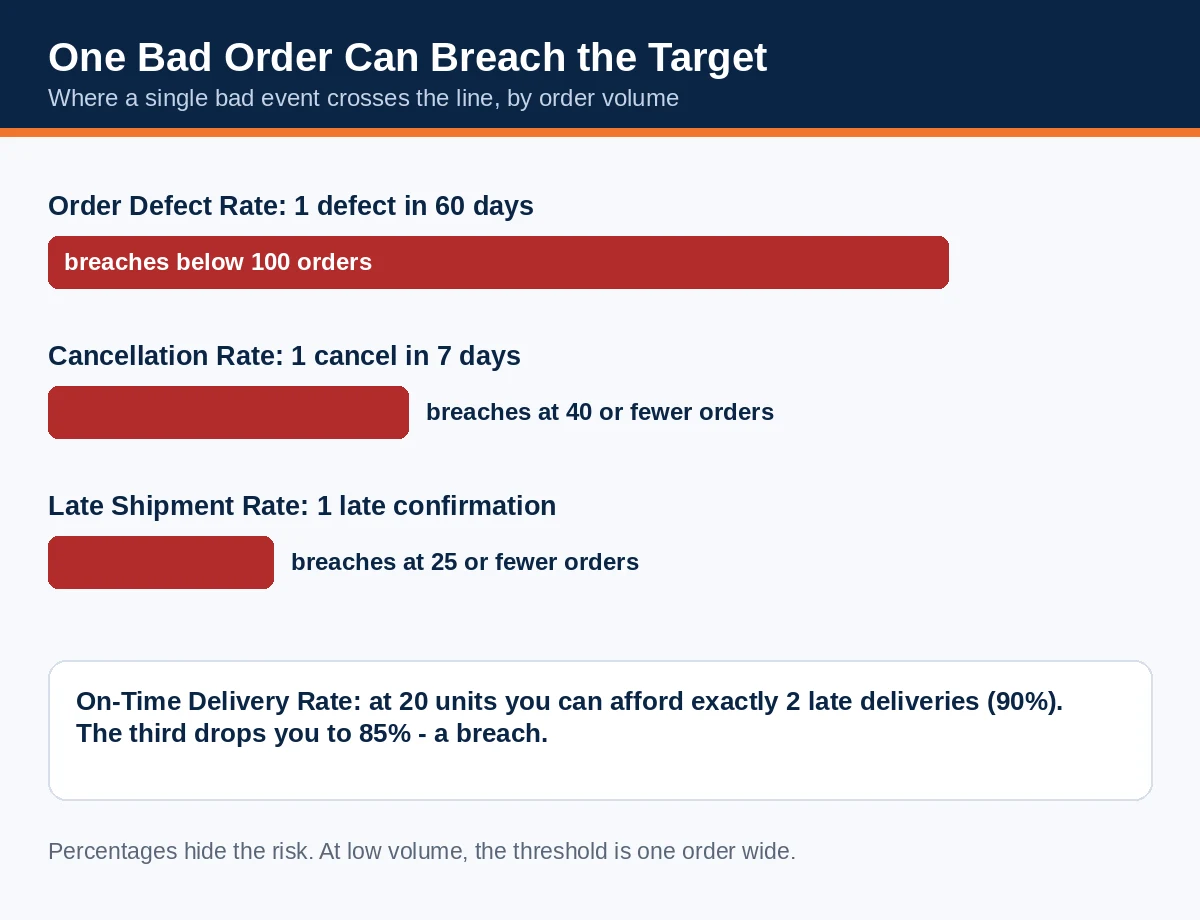
- The low-volume trap: the metrics are calculated across your orders and attributed back to the offer behind the failing events. On a slow SKU the thresholds are one order wide: one defect breaches ODR if you had under 100 orders in 60 days; one cancellation breaches the cancel rate at 40 or fewer orders in a week.
- The fix is operational, not rhetorical: diagnose the metric, fix the root cause in your settings, stock or process, and follow the reactivation steps in the warning email — in that order.
- The shield exists: Shipping Settings Automation + Automated Handling Time + OTDR-protected labels bought through Amazon Buy Shipping or Veeqo give eligible units OTDR protection — late carrier deliveries stop counting against you.
1. What changed on 31 August 2026 — and what Amazon didn't say
Amazon's announcement, titled "Review Account Health updates for FBM offers," appeared in the US Seller Central forums in late August 2026. It is short — about 150 words — and its operative sentence is this: from August 31, 2026, any FBM offer that puts a seller's Account Health at risk will be temporarily deactivated, while other active listings and the overall Account Health score are not impacted. Two procedural commitments came with it: a warning email before any deactivation, containing details of the issue and the steps needed to resolve it; and a home for the consequences — deactivated offers surface in the Account Health dashboard under Other Policy Violations, which is also where the reactivation instructions live.
This was the second application of the same idea. On 28 February 2026, Amazon had already narrowed On-Time Delivery Rate enforcement: instead of deactivating all a seller's seller-fulfilled listings when OTDR fell below 90%, it began deactivating only the listings most responsible for the drop — with a graduated structure under which, for sellers in the 60–80% band, the listings below 80% were taken down first, immediate reactivation was available, and more listings could follow if the rate didn't recover. August generalised the model from one metric to four.
Now the honesty paragraph, because it shapes everything else in this guide. The announcement does not state the thresholds at which a metric triggers an offer deactivation, does not say how long the warning email precedes deactivation, and does not define how long "temporarily" lasts. It links to the four metrics' existing policy pages rather than to a help page about the new behaviour. The targets used throughout this guide are therefore the metrics' long-standing published performance targets — the only numbers Amazon has ever published for them, and the numbers your Account Health dashboard displays. Work to those, with margin, because no other defensible numbers exist.
One more design decision to understand, because sellers in the announcement thread attacked it immediately: the four metrics are still calculated across your seller-fulfilled orders as a whole, then attributed back to the offer that generated the failing events. A late shipment caused by a carrier depot failure, a warehouse staffing gap or a bad address is, mechanically, not a property of the SKU — but the SKU is what gets switched off. Whether Amazon separates offer-specific causes from account-wide or carrier-wide ones is not explained in the announcement. Plan on the simple version: the offer behind the bad orders carries the penalty, whatever the underlying cause, and your protection is process and settings, not fairness arguments.
2. The four metrics: targets, windows, and the one-bad-order problem
| Metric | Published target | Measured over | What counts against you |
|---|---|---|---|
| Order Defect Rate (ODR) | Below 1% | 60 days | Orders with negative feedback (1–2 stars), an A-to-Z Guarantee claim, or a service chargeback |
| Late Shipment Rate (LSR) | Below 4% | 10-day and 30-day views | Seller-fulfilled orders whose shipment is confirmed after the expected ship date |
| Cancellation Rate (pre-fulfilment) | Below 2.5% | 7 days | Orders you cancel before shipment confirmation — for any reason, including out of stock |
| On-Time Delivery Rate (OTDR) | At least 90% (95% recommended; 93.5% for Seller Fulfilled Prime) | Rolling 14 days | Tracked units delivered after the promised delivery date your own settings created |
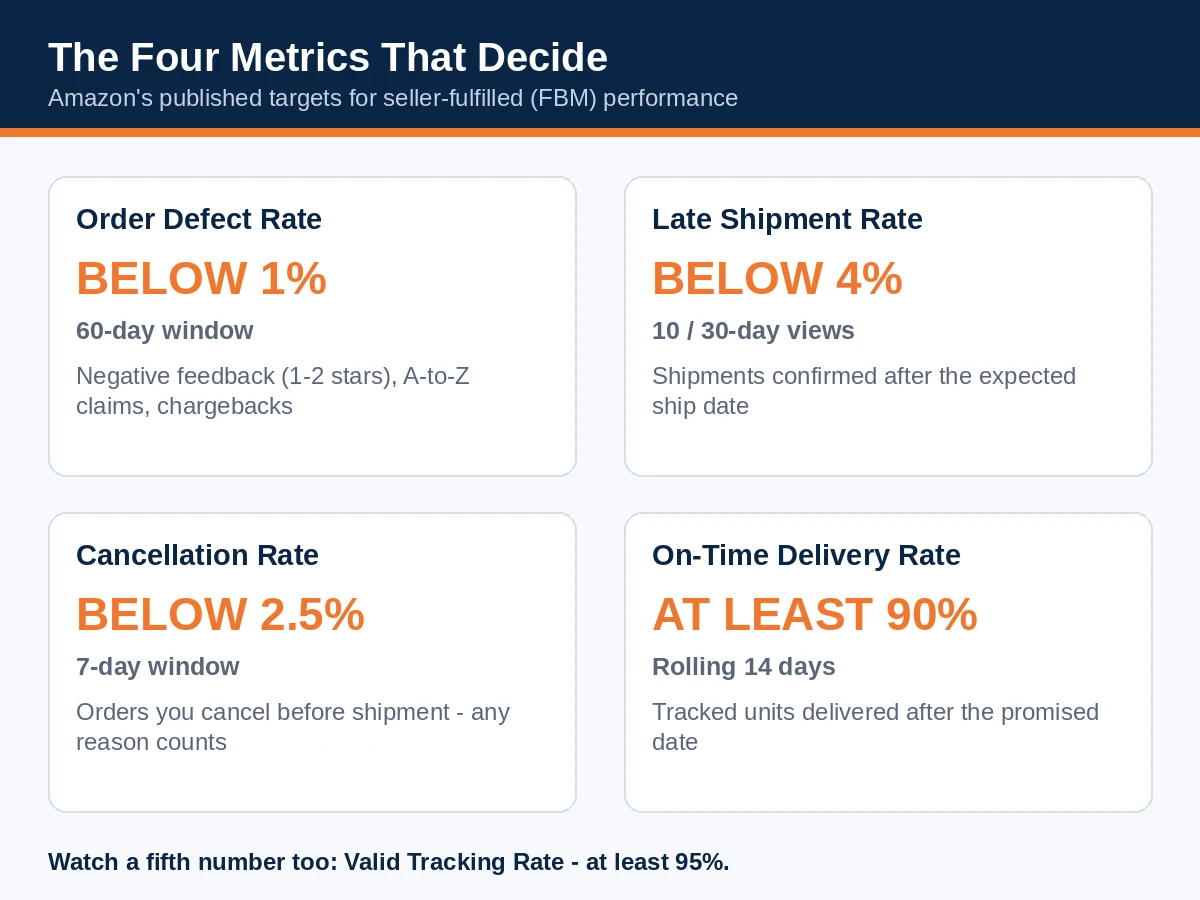
Read the table with the windows in mind, because the window decides both your risk and your recovery time. The Cancellation Rate forgives fastest: a bad week ages out in seven days. ODR is the slow wound — a defect sits in the calculation for a full 60 days, so an ODR breach is a two-month project, not a bad weekend. OTDR is the twitchiest: a rolling 14-day window on units (and note the calculation quirk — it is built from units whose promised date fell in the last 21 days, excluding the most recent 7, since those are still in transit; Amazon's published FAQ for the UK store also notes OTDR is only enforced once a seller ships 20+ units in the period).
The one-bad-order problem. Thresholds expressed as percentages hide what they mean at low volume, and most FBM offers are low volume. The arithmetic:
- ODR: one defect — a single 1-star feedback, one A-to-Z claim — breaches the target if you shipped fewer than 100 orders in 60 days (1 ÷ 99 = 1.01%).
- Cancellation Rate: one seller cancellation breaches at 40 or fewer orders in the 7-day window (1 ÷ 40 = 2.5%, and the target is below 2.5%).
- Late Shipment Rate: one late confirmation breaches at 25 or fewer orders in the window (1 ÷ 25 = 4.0%, target below 4%).
- OTDR: at 20 units you can afford exactly 2 late deliveries (18 ÷ 20 = 90%); the third puts you at 85%.
This is why offer-level enforcement bites small sellers hardest, and why the top-voted response in Amazon's own announcement thread was a low-velocity seller pointing out that a single defect of any kind can now remove a listing. It is also why "my metrics look fine" is meaningless at account level: an account doing 500 orders a month can sit at 0.4% ODR while the attributed performance of one slow offer is a breach. Check per offer, or at least per shipping template and warehouse, not just the headline numbers.
A fifth number belongs on your watchlist even though the announcement doesn't name it: Valid Tracking Rate (at least 95%). Some coverage of the change lists it among the evaluated policies; Amazon's announcement names four, and this guide follows the announcement. But VTR is a standing shipping-performance requirement, it feeds the same Account Health page, and — as Section 6 shows — the cleanest way to satisfy it (Buy Shipping) is part of the protection stack anyway. Watch all five; defend the four.
3. How a deactivation actually unfolds
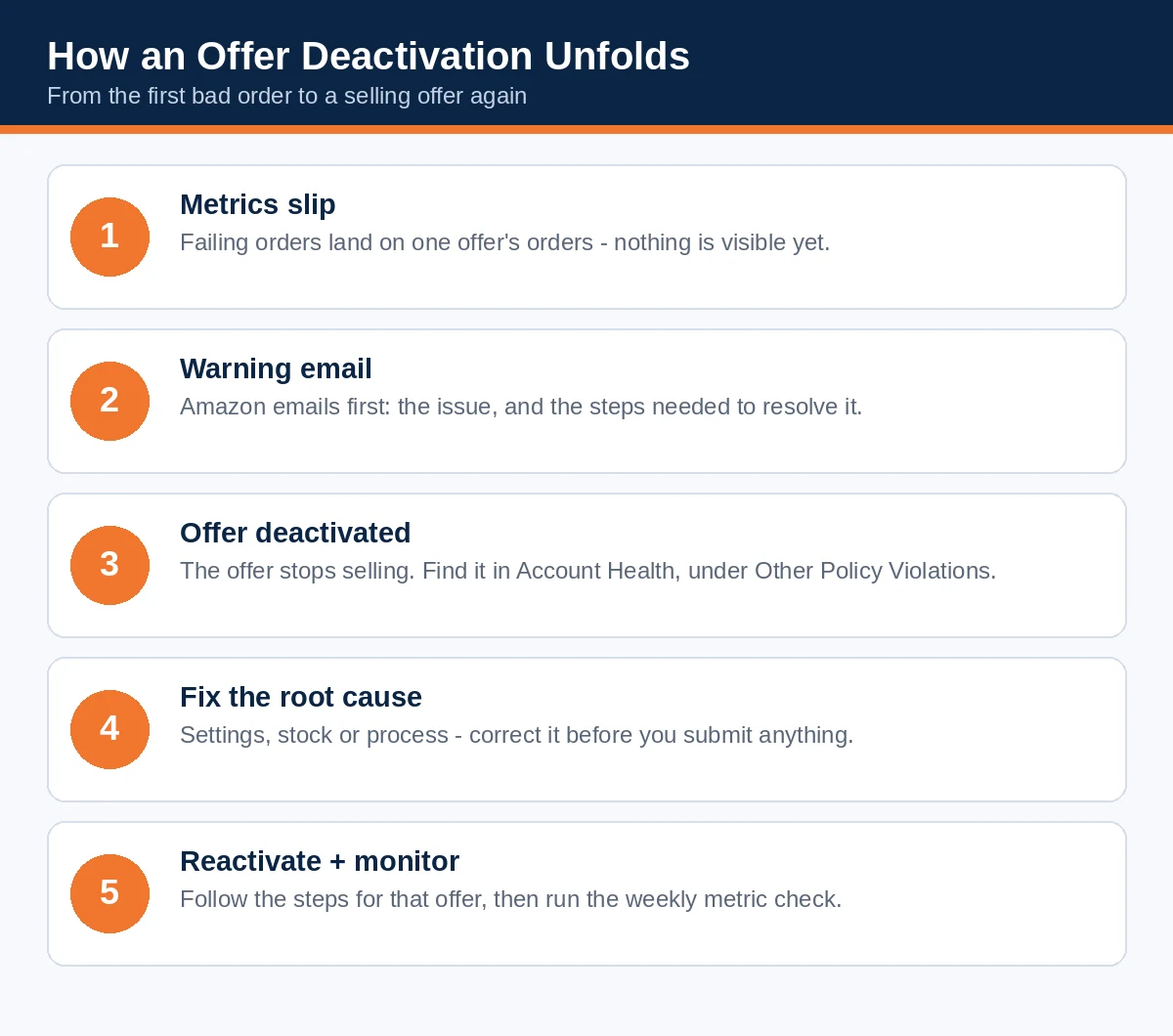
Based on the announcement and the February OTDR precedent, the sequence is:
- Your metrics slip on a specific offer's orders. Nothing visible happens yet. This is the stage the weekly routine in Section 7 exists to catch.
- The warning email arrives. Amazon commits to sending it before deactivation, with details of the issue and the steps needed to resolve it. It does not commit to a lead time. Treat the email as urgent and as the start of your record: save it as a PDF, with subject line, date, affected offer, metric and any deadline intact.
- If the issue continues or stays unresolved, the offer is temporarily deactivated. It appears in Account Health → Other Policy Violations, alongside the reactivation instructions. The offer stops selling; the listing, the account and your other offers remain live, and your Account Health Rating is not impacted by the offer action itself.
- You fix and reactivate (Sections 4–6), following the steps in the warning email for that offer and metric.
What you lose in a deactivation is narrower than an account action but not trivial: sales on that SKU stop immediately; Sponsored Products campaigns pointed at the offer have nothing to deliver; ranking and conversion history stall while competitors keep moving; FBM inventory sits in your warehouse instead of Amazon's; and if the deactivated offer was your FBA stock-out backup, you've lost the safety net at the same moment. What you do not lose — and this is the genuine improvement — is everything else. The sellers at real risk are those for whom one or two offers are the business: for them, "offer-level" and "account-level" are nearly the same event wearing different clothes.
What it looks like in practice. A composite example, built from the mechanics above. A seller runs eight FBM offers and ships about 600 orders a month; the account Order Defect Rate sits at a comfortable 0.3%. One offer — an oversized lamp that can't go FBA economically — sells just 34 units in 60 days. One lamp arrives carrier-damaged; the buyer skips messages and files an A-to-Z claim. Attributed to that offer, the defect maths is 1 ÷ 34 = 2.94% against a target of below 1% — while the account-level number barely moves and the Account Health page stays green. The warning email lands in a promotions tab. Nine days of silence later the offer is dark, its Sponsored Products campaign has nothing to sell, and a SKU worth roughly $1,900 a month is earning zero — inside an account every dashboard describes as healthy. Nothing in that story requires a bad operation. It requires a slow offer, a single bad order, and a seller watching the wrong screen.
Two scope notes. First, isolation has a limit: the model assumes an isolated problem. The same failure appearing across many offers reads as a fulfilment-system failure, and the February OTDR policy was explicit that sellers significantly below threshold, or repeatedly failing, could still face deactivation of all seller-fulfilled listings. Second, this announcement is a US store announcement; other marketplaces run their own variants (the UK, for example, moved to a 90% OTDR requirement with listing-level enforcement on its own timeline). Check your marketplace's forums for its version rather than assuming the US text travels.

4. The first 24 hours: diagnose before you touch anything
Whether you're holding a warning email or an offer that's already dark, the first day is for evidence and diagnosis — not for firing off an appeal. Reactivation guidance for these deactivations is consistent: fix the metric that failed, following the steps in Amazon's warning email. An appeal written before the fix exists is a promise; Amazon reactivates on corrections.
Step 1 — Preserve the record. Save the warning email as a PDF. Note the affected ASIN and SKU, the marketplace, the metric named, and any deadline. If the offer is already deactivated, screenshot its entry under Account Health → Other Policy Violations, including the instructions shown there.
Step 2 — Pin down the offer's exact configuration. Record the SKU's handling time, shipping template, ship-from address, fulfilment method and — if a 3PL ships it — whose hands touch it and how their data reaches you. Sellers routinely discover at this step that the offer wasn't set up the way they believed: a template inherited from another product, a handling time set in an optimistic moment, a warehouse that doesn't work weekends attached to a template that assumes it does.
Step 3 — Pull the order-level data behind the metric. You need the actual orders, not the percentage. From Seller Central's performance and order reports, assemble: order IDs and dates; promised ship and delivery dates; shipment confirmation timestamps; tracking numbers and carrier acceptance and delivery scans; buyer messages; cancellation reasons; A-to-Z claims and negative feedback tied to those orders. Group the failures before you interpret them — late confirmations that cluster on weekends are a settings problem, defects that cluster on one SKU are a product or packaging problem, cancellations that cluster after a promotion are an inventory-feed problem. The cluster tells you the root cause; the percentage only tells you there is one.
Step 4 — Fix the root cause (Section 5), then reactivate (Section 6). Do not reverse the order.
5. Fix it by metric: root causes and corrections
Short on time? The metric in the email tells you where to look first:
| Metric named | Look first at | Usual root cause |
|---|---|---|
| Cancellation Rate | Your stock numbers | Oversell, stale inventory feed, supplier stock-out |
| Late Shipment Rate | Your confirmation timestamps | Missed cutoffs, batched confirmations, weekend gaps, handling time set too tight |
| Order Defect Rate | The orders behind the claims and feedback | Delivery failures, product/packaging faults, slow buyer responses |
| On-Time Delivery Rate | Your shipping templates | Transit times the carrier never actually met, wrong ship-from address |
Cancellation Rate — it's almost always inventory
Seller-initiated cancellations are overwhelmingly a stock-accuracy failure: an oversold SKU, a stale quantity feed, a supplier who ran dry, a 3PL sync that updates every few hours while your listing sells in minutes. Corrections that hold: increase feed frequency or add a buffer quantity that keeps the offer from selling the last units twice; pause offers whose stock you cannot verify rather than letting them cancel; fix marketplace-to-warehouse mapping errors that show stock you don't have at the location the template promises. And learn the discipline the 7-day window rewards: if you must cancel, one cancellation at low volume is the breach — so the real fix is making sure the order can never be taken in the first place.
Late Shipment Rate — it's the confirmation clock, not the carrier
LSR measures when you confirm shipment against the expected ship date — a label printed late, a warehouse cutoff missed, confirmations batched at end of day, a weekend gap between your handling-time setting and your actual operation. Corrections: set handling time to what the warehouse truly achieves on its worst regular day, not its best; move order cutoffs earlier than the carrier's last collection, not equal to it; confirm at dispatch, not in an evening batch; close the weekend gap either by staffing it or by telling the template the truth. Note that Amazon now enforces accurate handling times: since 29 June 2026, if Amazon flags your handling time as inaccurate and you don't correct it within 30 days, Amazon sets it for you and locks it for 180 days. Set it honestly yourself and keep the key. The Order Handling Capacity setting is the pressure valve for spikes: orders above your set capacity automatically gain an extra day of handling time instead of becoming late shipments.
Order Defect Rate — three doors in, all of them slow to leave
ODR counts orders carrying negative feedback (1–2 stars), an A-to-Z claim, or a chargeback, over 60 days. The shipping-related share of defects — late delivery, item not received, poor communication — shrinks with the LSR and OTDR fixes and with proactive buyer messaging when something slips. The product share — wrong item, damaged in transit, not as described — is a listing-accuracy and packaging audit. Two disciplines matter here. First, work the feedback you can work: seller feedback that meets Amazon's four removal grounds should be reported, and everything else should be answered with service recovery — this guide's companion piece on seller feedback covers the removal grounds, the star-only rules and the templates in full. Second, respect the window: because defects age out only after 60 days, an ODR fix shows up in the metric slowly even when the operation is already fixed — which is exactly why the reactivation submission needs evidence of the process change, not just a promise that the number will fall.
On-Time Delivery Rate — it's your promise, so rewrite it honestly
OTDR judges deliveries against the delivery date your own handling and transit settings promised (before any extensions Amazon adds). Most OTDR failures are therefore authored by the seller: transit times copied from a carrier brochure, templates that ignore weekends, a ship-from address that moved and never got updated. Corrections: audit every shipping template against real delivery data by zone; set transit times from your carriers' actual performance, not their marketing; and then consider handing the whole calculation to Amazon — Section 6.

6. Getting reactivated — and the protection stack that prevents round two
Reactivation. Start from the instructions attached to the offer under Other Policy Violations and in the warning email; they are metric-specific. Where a submission or plan of action is required, the structure that works is the one Amazon's reviewers are trained to find:
- Identify — the affected ASIN/SKU, fulfilment method, the metric, the number of orders involved and the period you reviewed.
- Root cause, specifically — "our 3PL inventory feed updated every four hours, which left the SKU buyable after sellable stock ran out" reopens doors; "we had shipping issues" does not.
- Corrective action, already completed — the paused SKU, the corrected template, the earlier cutoff, the feed now updating every 15 minutes. Past tense, with dates.
- Prevention with controls — who checks which metric, how often, against what internal trigger, and what happens when the trigger is hit. "We will monitor closely" is not a control; "the ops lead checks all four metrics every Monday and Thursday, and any offer within 25% of a threshold is paused for review" is.
- Proof, attached selectively — carrier scans, template screenshots, inventory logs, 3PL correspondence, order-level reports. Evidence that supports the root cause and the fix; volume for its own sake makes the reviewer's job harder and your case weaker.
In the February OTDR version of this policy, immediate reactivation was available for the graduated-band deactivations once the issue was addressed; the August announcement doesn't restate the mechanics for all four metrics, so follow the steps shown for your offer rather than assuming. And if the same problem later appears across the catalogue, expect Amazon to stop reading it as isolated.
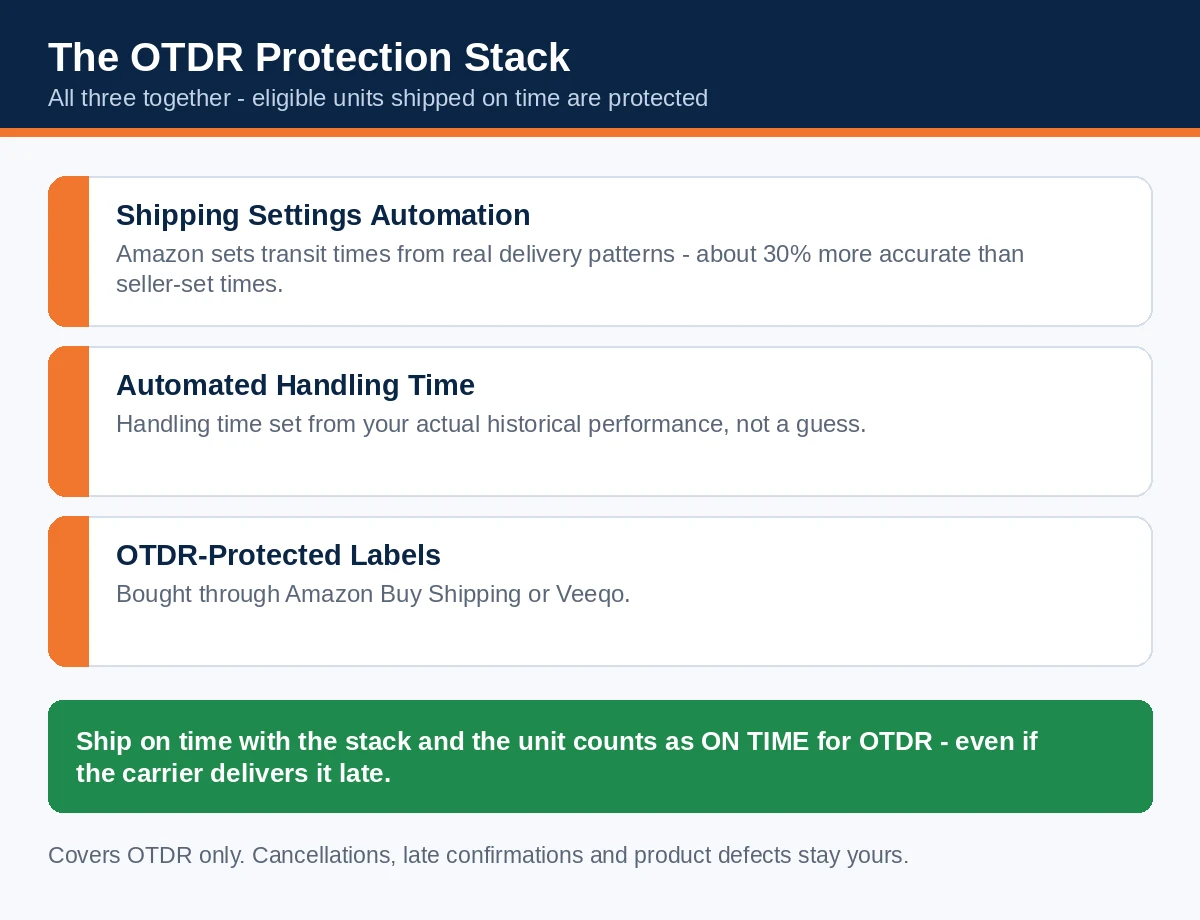
The protection stack. For OTDR specifically, Amazon offers something rare: a way to make late carrier performance stop counting. US Professional sellers who ship from the US or China get OTDR protection on eligible units shipped on time when all three are in place:
- Shipping Settings Automation (SSA) — Amazon calculates transit times from actual delivery patterns; Amazon says SSA promises are on average 30% more accurate than seller-set transit times.
- Automated Handling Time (AHT) — handling time set from your real historical performance (Seller Fulfilled Prime and premium shipping are exempt from this element, but must ship on time).
- OTDR-protected labels — bought through Amazon Buy Shipping or Veeqo.
Ship on time with that stack and the unit counts as on-time for OTDR even if the carrier delivers it late. Buy Shipping brings two further protections on its own: automatic valid tracking (your VTR takes care of itself) and, for US sellers who ship on time, Amazon — not you — funds refunds on delivery-related A-to-Z claims, which feeds back into ODR. There is a stick behind the carrot: on a repeat OTDR violation, Amazon can require you to run SSA, Automated Handling Time and Buy Shipping for your seller-fulfilled orders for the next 180 days. Adopting voluntarily, on your own schedule, is the better version of that story.
Protection has boundaries, so be clear-eyed: it covers OTDR exposure on protected, on-time-shipped units. It does nothing for cancellations (your stock problem), late confirmations (your clock problem) or product defects (your listing problem). The stack is a shield for the one metric most exposed to carrier behaviour — which is precisely the metric where the "the SKU didn't cause this" complaint is most justified.
7. The weekly routine: 15 minutes, buffer targets, audit order
Offer-level enforcement rewards sellers who check at offer level on a schedule. Fifteen minutes, twice a week if volumes justify it, once if they don't:
- Account Health → Shipping Performance and Customer Service Performance: read all four metrics (five, with VTR) against Amazon's targets and your internal buffer targets — operate at roughly half the permitted defect rates, because thresholds are the edge of the cliff, not a cruising altitude:
| Metric | Amazon target | Your internal trigger |
|---|---|---|
| Order Defect Rate | Below 1% | Act at 0.5% |
| Late Shipment Rate | Below 4% | Act at 2% |
| Cancellation Rate | Below 2.5% | Act at 1% |
| On-Time Delivery Rate | At least 90% | Act below 95% |
| Valid Tracking Rate | At least 95% | Act below 98% |
- Other Policy Violations: confirm it's empty. This is the deactivation inbox; finding an entry here should never be a surprise delivered by a sales report.
- Drill into any metric trending the wrong way to the orders and the offers behind them, while the window is still young enough to fix cheaply.
- Audit offers in risk order, not catalogue order: highest revenue first, then seasonal offers approaching their window, offers shipped by a 3PL, offers fulfilled from multiple locations, offers dependent on supplier stock, and FBA-backup offers that will switch on under Q4 pressure — with templates, handling times and stock feeds re-verified for each. Do this audit before peak season, not during it: Q4 adds temporary staff, carrier congestion and backup offers switching on, which is to say it adds exactly the conditions that produce all four failures at once.
The companion downloads for this guide — the weekly check sheet and the first-24-hours reactivation checklist — turn this section into a one-page habit.
Frequently asked questions
I got a warning email, but my Account Health page looks healthy. Is the email a mistake?
Probably not — that combination is the design of the new model, not an error. The warning concerns one offer's attributed performance; your Account Health Rating is expressly not impacted by an offer action, so the page can look green while an offer is heading for deactivation. Check Account Health → Other Policy Violations, then pull the named offer's orders and check the named metric against them.
Does an offer deactivation hurt my Account Health Rating?
Under the announcement, no: the offer is deactivated while your overall Account Health score and other listings are not impacted. The account-level consequences arrive only if the same failure becomes a pattern across offers or a metric collapses account-wide — the February OTDR policy kept whole-catalogue deactivation in reserve for severe or repeated failure.
Can one bad order really deactivate my offer?
It can breach the metric, yes — the maths is in Section 2. One defect breaches ODR below 100 orders in 60 days; one cancellation breaches the cancel rate at 40 or fewer orders in a week. Whether a breach becomes a deactivation depends on Amazon's enforcement, which the announcement doesn't detail; the safe assumption for a low-volume offer is that a single bad order is a serious event.
How long does "temporary" deactivation last?
Amazon's announcement doesn't define it. The workable reading: until the failing issue is fixed and the reactivation steps for that offer are completed — and, where a metric window is involved, until your numbers no longer put the account at risk. The February OTDR version allowed immediate reactivation in its graduated band; don't count on identical mechanics for every metric.
Does this apply to my FBA offers?
No. This is an FBM enforcement model — the four metrics measure seller-fulfilled execution. FBA offers are judged on different policies entirely. Hybrid sellers should note that an FBA listing's merchant-fulfilled backup offer is fully exposed.
Is Valid Tracking Rate one of the four?
Not in Amazon's announcement, which names Cancellation Rate, Late Shipment Rate, Order Defect Rate and On-Time Delivery Rate. Some secondary coverage swaps VTR in. Keep VTR (target at least 95%) on your watchlist regardless — it is enforced through other routes, and Buy Shipping satisfies it automatically.
I'm in the UK / EU / another marketplace. Do these rules apply to me?
The announcement discussed here is from the US store. Other marketplaces have moved in the same direction on their own timelines — the UK, for example, adopted a 90% OTDR requirement with listing-level enforcement from February 2026. Treat the model as global direction and check your own marketplace's announcements for its dates and details.
I use a 3PL. Who carries the penalty when they ship late?
You do. The metrics and the deactivation attach to your offer; your 3PL's performance is, to Amazon, your performance. Which makes feed frequency, cutoff discipline and scan data from your 3PL contractual matters now, not courtesies — get them in writing before peak, not after a deactivation.
Over to you
If you ship anything yourself, the productive order of work is: audit your highest-revenue FBM offers against the four metrics today; switch on the protection stack before you need it; and put the 15-minute check on a calendar, because the warning email is a courtesy, not a monitoring system. And if a warning or a deactivation has already landed, you now know the shape of the work — diagnose from the orders, fix the process, then submit the correction.
Read next
- Amazon Seller Feedback: The Complete Guide to Ratings, Removals and Recovery (2027) — the feedback half of ODR: the four removal grounds, the star-only rules, and the weekly routine that keeps defects from becoming claims.
- How to Get Reviews on Amazon in 2027: The Complete TOS-Safe Playbook — the review foundations this catalogue is built on.