Amazon’s 75-Character Title Rule
How to Rewrite Your Titles and Item Highlights Before Amazon’s AI Does It for You
Since 27 July 2026, Amazon titles are capped at 75 characters — and Amazon is gradually replacing longer titles with its own AI rewrites. This 2027 guide gives you the audit, the formula and four worked rewrites, so you keep control of your own words. Updated October 2026.

Introduction
If Amazon has already shortened one of your product titles — or you've opened a listing to find your carefully written title replaced with something bland that could describe almost any product — you have met Amazon's new title rule. Since 27 July 2026, product titles in every category except media must be 75 characters or fewer, including spaces. In their place, Amazon has given sellers a second field: Item Highlights, a searchable block of up to 125 characters that appears alongside your title in search results and on the product detail page.
The change is not optional, and it is not finished. Amazon is working through the catalogue in batches, gradually replacing over-limit titles with its own AI-generated recommendations. Sellers who rewrite their own titles keep control of the wording. Sellers who wait get whatever the AI leaves them — and judging by the reaction on Amazon's own seller forums, where the announcement thread passed 15,000 views and Amazon's dedicated Q&A event on the title update drew more than 400 replies, many sellers are unhappy with what the AI has produced: rewrites that make listings sound "generic" and "non-descriptive" are now a fixture of the forums.
This guide gives you the complete fix: what changed, what happens if you do nothing, a step-by-step audit for your whole catalogue, a simple formula for a strong 75-character title, how to use Item Highlights properly, the category traps to watch for, four worked before-and-after rewrites with exact character counts, and a weekly routine that keeps you ahead of the next batch of AI rewrites.
1. What changed on 27 July 2026 — and why
Amazon announced the change on 10 June 2026 in a Seller News post titled "Updates to improve your product titles begin on July 27", and enforcement began on 27 July 2026. The core of the new policy:
- Titles are capped at 75 characters, including spaces, in all categories except media (books, music, video and similar media categories are exempt).
- A new field, Item Highlights, adds up to 125 characters. Item Highlights is searchable, and it is displayed together with your title in search results and on the detail page.
- Titles over the limit are gradually updated to Amazon's AI recommendation. Your listing stays active throughout — this is a rewrite, not a suppression.
- Brand owners get a review window. If you own the brand, Amazon's proposed changes appear in Review Listing Changes, and you have 14 days to review, modify or approve them before they go live.
One way to think about the arithmetic: 75 + 125 = 200 characters of shopper-facing text — broadly the space many sellers used to have in the title alone, now split across two fields with two different jobs. The title identifies the product fast; Item Highlights carries the supporting detail.
Why did Amazon do this? The stated aim, reflected in the announcement's title, is to improve product titles. Long, keyword-stuffed titles are hard to read — especially in search results, where they are truncated anyway — and often repeat the same terms. The new structure forces the key information into a short title and pushes the rest into a designated place: the space is still there, but you have to organise it deliberately.
Two things did not change. First, Amazon's existing title formatting rules — in place since January 2025 — still apply on top of the length limit: no promotional or subjective claims (words like "best seller" or "#1"), no word repeated more than twice, and restrictions on special characters. A 70-character title that breaks those rules has simply traded a length problem for a content problem. Second, your bullets, backend search terms and A+ Content still exist and still matter — Section 5 explains how to divide the work between all of these fields.
2. What happens if you do nothing
Plenty of sellers are tempted to let Amazon handle it. Here is what that actually looks like:
Your title gets rewritten anyway. Amazon is updating over-limit titles in batches, with the rollout continuing through the end of 2026. There is no opt-out and no deadline after which you are safe — if your title is over 75 characters, it is in the queue.
The replacement is written by an algorithm, not by you. The AI recommendation is generated from your listing data, and it optimises for compliance, not for your conversion rate. It does not know which keyword drives your sales or which differentiator wins your clicks against your main competitor. Forum threads are full of sellers reporting rewrites that strip out the very terms that made the listing findable — near-identical, generic titles across products that used to be distinct.
Brand owners get a safety net; everyone else gets a surprise. If you are enrolled in Brand Registry, proposed AI changes wait in Review Listing Changes for 14 days, so you can catch a bad rewrite before shoppers see it — but only if you actually check. If you are not brand-registered, you may have no review step at all: the first sign of a rewrite could be a drop in traffic you have to diagnose after the fact. (If you sell your own brand and are not yet in Brand Registry, this rule is one more practical reason to enrol.)
Your listing stays live — which cuts both ways. Because listings remain active during rewrites, there is no dramatic "fix this or else" moment. The damage is quieter: a weaker title, slightly worse click-through, slightly worse conversion, compounding week after week across every affected ASIN.
Rewriting your own titles is the same rewrite Amazon will do for you — except you choose the words. The rest of this article is about doing it well, once, in priority order.
3. Step one: audit your catalogue before you rewrite anything
Do not start by fixing the first long title you spot. Start with an audit, so you fix the titles that earn you money first and never miss one entirely.

Step 1 — Export your catalogue. Pull a full list of your active ASINs with their current titles, from your inventory reports or Manage All Inventory. If you work in a spreadsheet, that's where this audit lives. (We've built the spreadsheet for you — the free Catalogue Audit Worksheet that accompanies this article has every column below already set up.)
Step 2 — Count the characters. Add a column that counts the characters in each title, spaces included — in any spreadsheet this is a one-line length formula. Flag every title over 75 characters. Most established catalogues are surprised by the count: titles written under the old limits are routinely 150–230 characters.
Step 3 — Rank by revenue. Sort the flagged titles by monthly revenue (or units sold). Your top sellers get rewritten first: they have the most to lose from a bad AI rewrite, and they are the listings where your own judgement about keywords and differentiators is most valuable.
Step 4 — Check what Amazon has already done. Before rewriting, look in two places. Brand owners: open Review Listing Changes — pending AI proposals sit there with their 14-day windows already running, and a title with a live window needs a decision now, not after your audit. All sellers: check View Enhancements and your listing pages for titles that have already been changed, and note them in the audit. A title the AI replaced last week needs your own version immediately, not a careful rewrite of text that no longer exists.
Step 5 — Work in batches, in priority order. Rewrite the top tier, submit, and let the changes settle (Section 8 covers monitoring). Then move down the list.
Step 6 — Include every title, not just the obvious ones. Parent ASINs have titles. Child ASINs have titles. Bundle listings have titles. Each one is checked against the same 75-character limit individually (see Section 6). The most commonly missed items are child variations and older, slow-moving listings — precisely the ones nobody is watching when the AI gets to them.
4. The 75-character formula
Seventy-five characters is roughly twelve to fourteen words. That is enough — if every word earns its place. The formula that works for most products has four slots:
Brand + Product Type + Primary Keyword + One Differentiator
Worked through the first of the examples you'll see in full in Section 7, a vegetable chopper:
| Slot | Text | Characters |
|---|---|---|
| Brand | Verano | 6 |
| Product Type | Vegetable Chopper Pro | 21 |
| Primary Keyword | 7-in-1 Dicer with Container | 27 |
| Differentiator | BPA-Free | 8 |
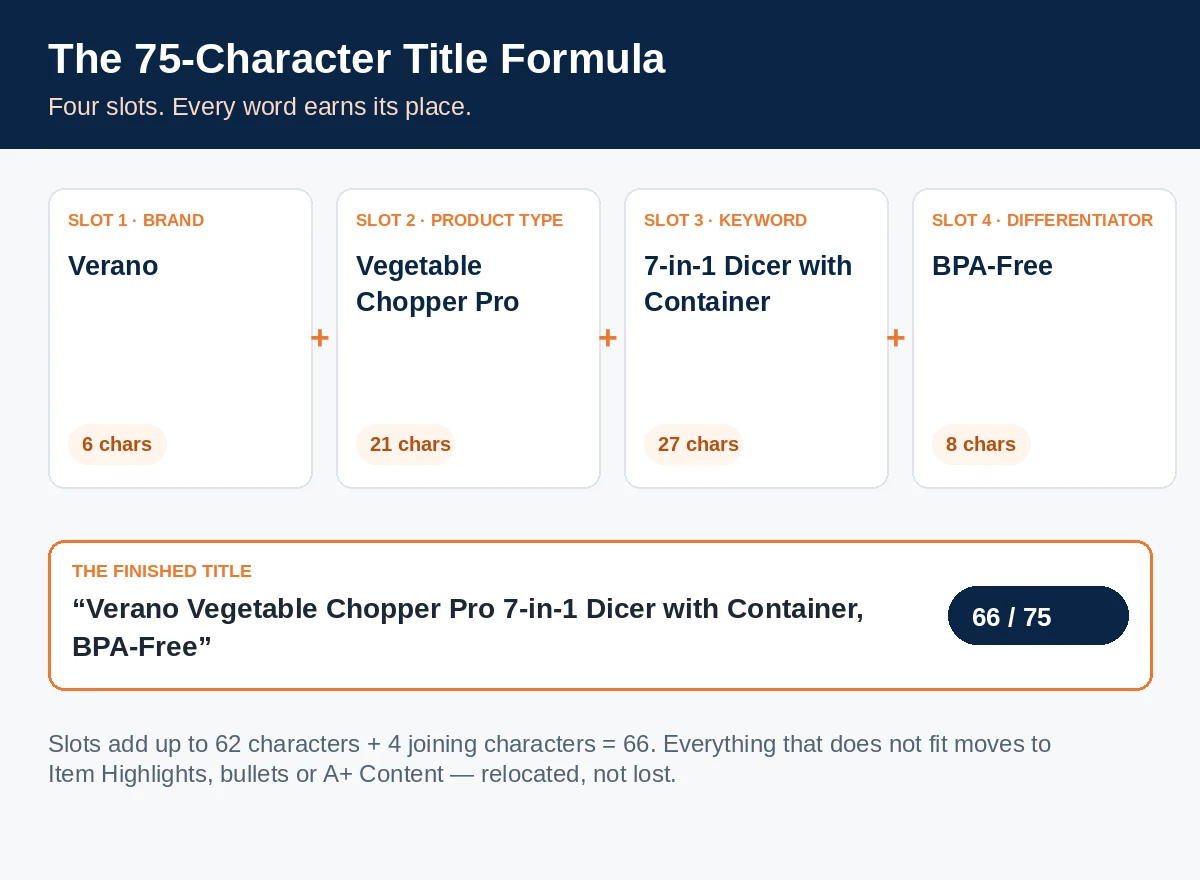
Add the spaces and the comma that join the slots (4 characters) and the finished title is 66 characters: "Verano Vegetable Chopper Pro 7-in-1 Dicer with Container, BPA-Free". Every slot does a job: the brand identifies the maker, the product type says what the thing is in shoppers' words, the keyword phrase captures the highest-value search term, and the differentiator answers "why this one?".
Some guidance on each slot:
Brand. Keep it short and exact. A long brand name is painful but unavoidable — a 20-character brand leaves you 55 characters for everything else, which argues for keeping the other slots ruthlessly tight rather than dropping the brand.
Product type. Name the product the way shoppers search for it, not the way your factory catalogue describes it. "Vegetable Chopper" beats "Manual Food Preparation Implement" every time.
Primary keyword. You get one main phrase, maybe two short ones. Choose from your own data: the search term that drives the most revenue for this ASIN, from your advertising search-term reports and Amazon's search query data if you have brand access. The old habit of chaining five synonyms ("chopper, dicer, slicer, cutter, mandoline…") is what the new limit kills.
Differentiator. One — the attribute that most often decides the purchase in your category: a material (stainless steel), a capacity (32 oz), a property (BPA-free, hypoallergenic), a compatibility (fits X), or what's in the box (with container). Everything else goes to Item Highlights, bullets or A+ — relocated, not lost.
Word order: brand first, or keyword first? This is the liveliest argument in the seller forums right now. The practical decision rule:
- Put the brand first if your brand has any recognition — repeat buyers, brand searches, a storefront, off-Amazon presence. Brand-first titles also read more professionally.
- Lead with the product type / primary keyword only if your brand means nothing to a cold shopper and the keyword phrase is how the product is discovered. Even then, the brand still belongs in the title, just after the product phrase.
Either way, the first ~40 characters matter most, because mobile search results truncate. Front-load whatever a shopper needs to see to decide "this is the right kind of product" — and check how your draft looks at 40 characters before submitting.
Finally, run every draft through three checks: count ≤75 including spaces; the formatting rules — no promotional claims, no word more than twice, no banned special characters; and the read-aloud test — it should sound like a product name, not a search query.
5. Item Highlights: the second 125 characters
Item Highlights is the new field that accompanies the shorter title: up to 125 characters, shown with your title in search results and on the detail page, and searchable — shoppers can find your listing through terms placed there.
Used well, Item Highlights answers the questions the title had no room for: material and construction ("stainless steel blades"), use cases ("for meal prep, salads and batch cooking"), size and pack detail that missed the title's differentiator slot, genuine secondary search phrases, and care facts ("dishwasher safe", "gift box included").
Three rules keep Item Highlights effective:
Rule 1: Don't repeat the title. Every word duplicated from your title wastes a character in a 125-character field. If the title already says "BPA-Free", the highlights should not open with "BPA-free". Read the two fields together as one combined block — 200 characters with no wasted words.
Rule 2: Write for the shopper scanning search results. Highlights appear with the title at the exact moment a shopper decides whether to click. Concrete, verifiable facts ("1.2L catch container", "cold for 24 hours") beat adjectives ("premium quality", "amazing value") — and promotional claims banned in titles have no place here either.
Rule 3: Be honest about what we don't know. Amazon confirms Item Highlights is searchable. What it has not confirmed is that terms there carry the same ranking weight as terms in the title. Until Amazon says otherwise, treat the title as your primary ranking real estate: your most important keyword belongs in the title, and highlights terms are supporting findability and click-winning detail — not a like-for-like replacement. Any guide promising equal weight is guessing.
Where the rest of the overflow goes. Even 200 combined characters won't hold everything your old 230-character title carried. The overflow has proper homes — give each field one job:
- Bullet points carry the full feature story: every benefit, specification and use case, expanded properly. Detail that needs a sentence belongs here, not in highlights.
- Backend search terms carry what shoppers type but you would never print: synonyms, alternative names, common misspellings. Don't waste backend space repeating words already in your title and highlights.
- A+ Content and Brand Story (for brand-registered sellers) carry the persuasion layer: comparison charts, lifestyle context, and cross-links to the rest of your range.
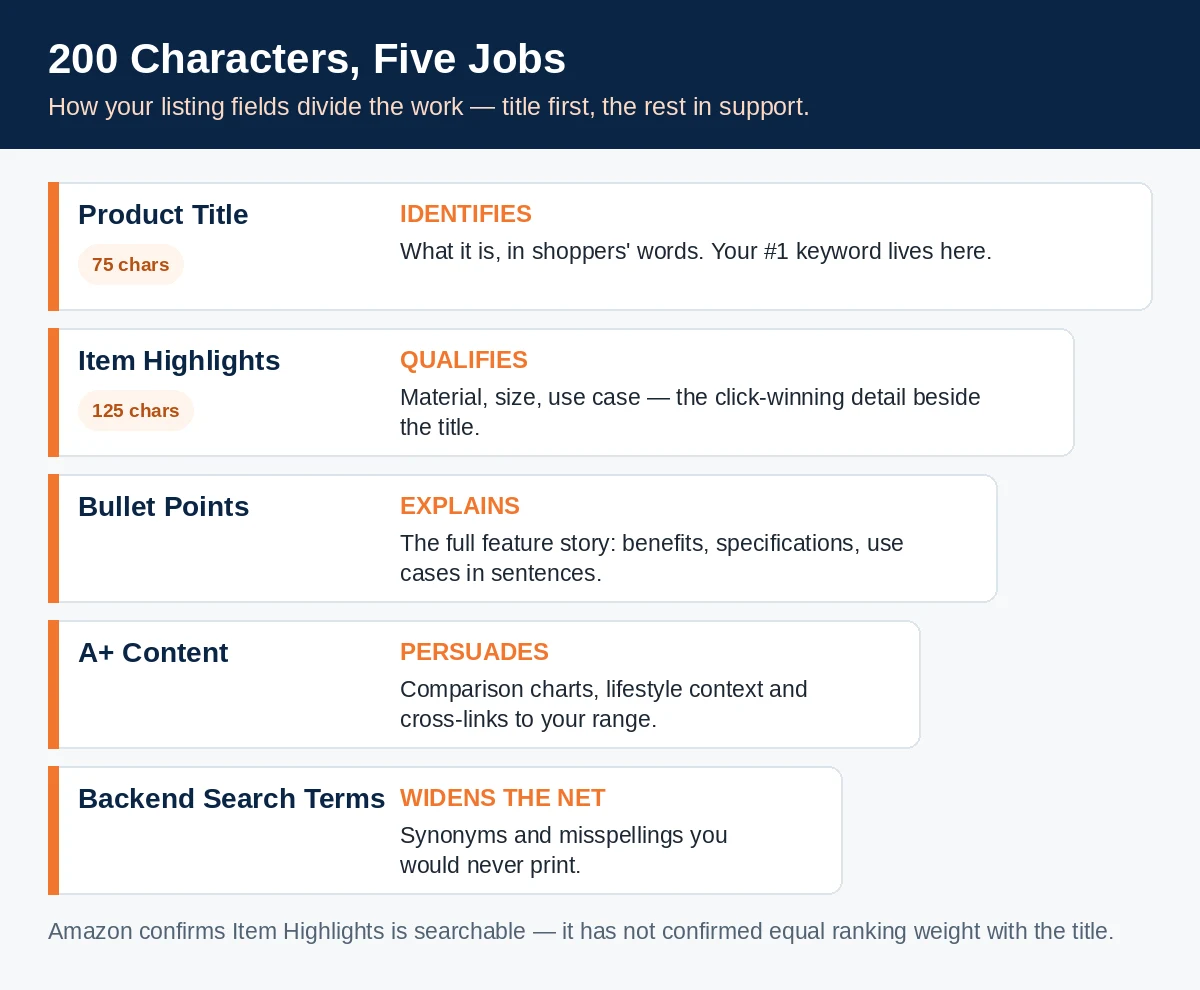
Think of it as a funnel: the title identifies, Item Highlights qualify, the bullets explain, A+ persuades, and backend terms widen the net.
6. Category landmines
Fine jewellery and other descriptor-heavy categories. Some categories require titles to carry specific factual descriptors — metal purity, material, stone type, dimensions — and those words are not optional fluff: leaving them out can breach category style requirements, while keeping them all can breach the length limit. Fine-jewellery sellers raised exactly this collision in the forums, posting titles that followed their category's style rules and still landed around 84 characters — nine over the cap before a single marketing word. If you sell in a descriptor-heavy category: mandatory descriptors first, branded phrasing last, and push every non-mandatory claim into Item Highlights or bullets. Example 3 below works through exactly this problem.
Parent AND child titles both count. In a variation family, the limit applies to every title individually — the parent's and each child's. Auditing only the parent is the most common mistake here. Children are also where titles quietly accumulate variation attributes ("…, Black, Size M", "…, Pack of 2") that eat the budget; decide which attributes genuinely belong in the child title and which the variation selector already communicates.
Bundles and multipacks. A bundle title must name multiple products and stay under 75 characters — the hardest squeeze of all. Lead with the bundle's identity (brand + bundle name + hero product), name at most one supporting component, and let Item Highlights and the first bullet carry the full contents list.
Media categories are exempt — your other categories aren't. If you sell books or media alongside other products, don't let the exemption confuse the audit: it belongs to the media listings, not to your account. Everything else you sell is under the 75-character rule.
7. Worked examples: before and after
Four real-style rewrites, in four categories. Character counts are exact and include spaces. In each case the "before" is a typical pre-rule title; the "after" follows the Section 4 formula; and the Item Highlights line carries the strongest of what was cut — without repeating the title.
Example 1 — Kitchen & Dining: vegetable chopper

Before (212 characters): "PREMIUM Vegetable Chopper Pro - 7 in 1 Onion Chopper, Veggie Dicer, Food Slicer and Cutter with Container - Mandoline Slicer for Kitchen Meal Prep, Salad, Potato, Carrot - BPA Free, Dishwasher Safe, Easy to Clean"
New title (66 characters): "Verano Vegetable Chopper Pro 7-in-1 Dicer with Container, BPA-Free"
Item Highlights (111 characters): "7 interchangeable blades for dicing, slicing and julienne; 1.2L catch container, dishwasher safe, non-slip base"
What changed: five chained synonyms (chopper/dicer/slicer/cutter/mandoline) collapsed into the one phrase shoppers use most; "PREMIUM" — a subjective claim that was never allowed — is gone; the blade count and care facts moved to highlights instead of being deleted.
Example 2 — Pet Supplies: dog harness

Before (235 characters): "No Pull Dog Harness for Medium Dogs - Reflective Adjustable Pet Vest Harness with 2 Leash Clips and Padded Handle, Breathable Mesh for Walking, Training, Hiking and Running - Easy Control for Small, Medium and Large Dogs, Black, Size M"
New title (67 characters): "PawNest No-Pull Dog Harness, Reflective Adjustable Vest with Handle"
Item Highlights (111 characters): "Two leash clips and a padded control handle; breathable mesh with four-point adjustment for a secure, comfy fit"
What changed: the original tried to speak to every dog size at once and repeated "harness" three times. The rewrite leads with the defining benefit (no-pull), keeps the two features buyers compare (reflective, adjustable), and lets the variation selector carry colour and size. The two leash clips — demoted to highlights — are still visible in search.
Example 3 — Jewellery: gold necklace

Before (232 characters): "14K Gold Plated Sterling Silver Necklace for Women - Dainty Paperclip Chain Necklace, 18 Inch, Hypoallergenic, Tarnish Resistant, Nickel Free - Gold Jewellery Gift for Women, Mum, Wife, Girlfriend on Anniversary, Birthday, Christmas"
New title (69 characters): "Aurielle 14K Gold-Plated Paperclip Necklace, Sterling Silver, 18 Inch"
Item Highlights (108 characters): "Dainty layered-look chain with secure lobster clasp; hypoallergenic and tarnish-resistant, gift box included"
What changed: this is the Section 6 landmine in action. The mandatory material facts — 14K gold-plated, sterling silver, 18 inch — keep their places in the title, because jewellery shoppers filter on them and category style rules expect them. What got cut is the gift-occasion list (Anniversary, Birthday, Christmas…), which never belonged in a title: it now lives in A+ Content and the bullets, where gift intent is actually sold. The trust facts (hypoallergenic, tarnish-resistant) survive in highlights.
Example 4 — Sports & Outdoors: insulated water bottle
Before (234 characters): "Insulated Water Bottle 32oz - Stainless Steel Sports Water Bottle with Straw Lid, Leak Proof, Sweat Free, Keeps Drinks Cold 24 Hours and Hot 12 Hours, BPA Free - For Gym, Travel, Camping, School, Office and Car Cup Holder, Matte Black"
New title (66 characters): "TrailPeak Insulated Water Bottle 32 oz, Stainless Steel, Straw Lid"
Item Highlights (103 characters): "Keeps drinks cold for 24 hours or hot for 12; leak-proof, sweat-free matte finish, fits car cup holders"
What changed: the performance numbers — the strongest reason to buy this bottle — moved intact into highlights, where they still appear beside the title in search results. The use-case list (gym, travel, camping, school, office) was pure stuffing and was cut; the one use detail with practical value, cup-holder fit, stayed.
A pattern runs through all four: nothing important was lost. Every fact that mattered is still on the listing, in the field designed for it. What disappeared is repetition, synonym chains and claims that were against the rules anyway.
8. Test, monitor, and be ready to revert
A rewrite is a change to your highest-traffic copy, so treat it like one: measure before and after, and keep the old version on record in your audit sheet.
Test formally where you can. Brand-registered sellers can use Manage Your Experiments to A/B test listing content — including titles, where eligible — so data, rather than opinion, picks the winner. It is also the cleanest way to settle the brand-first versus keyword-first argument for your catalogue: run both structures on comparable ASINs and compare click-through and conversion.
Where you can't test, monitor in a fixed window. For two weeks after each batch of rewrites, watch the same small set of numbers per ASIN: click-through rate on your main search terms; sessions and conversion rate on the detail page; sales against the period before the change (allowing for seasonality and promotions); and search-term movement — are the queries that used to find this ASIN still finding it?
Keep a simple decision rule. If a rewritten title holds or improves click-through and conversion over the two weeks, keep it and move to the next batch. If one ASIN drops sharply and the drop tracks the rewrite date, don't panic-edit daily — first check that nothing else changed (price, stock, a lost Buy Box, a rating change), then try one targeted adjustment: swap the differentiator, or restore the strongest keyword phrase from the old title within the 75 characters, ideally via Manage Your Experiments. And record the old title in your audit sheet before you change anything — once overwritten, by you or by the AI, that sheet is your only record of what used to work.
9. The weekly routine — and your free worksheets
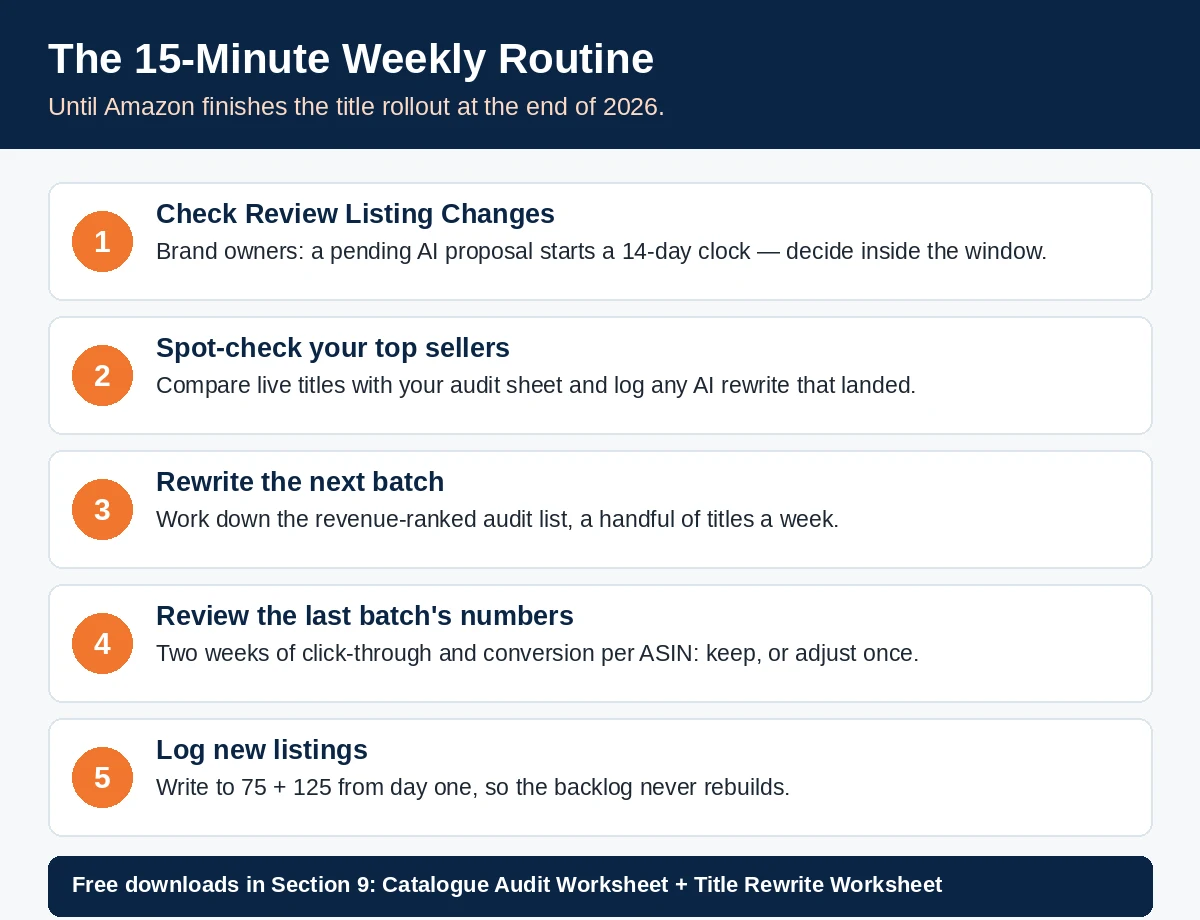
Because Amazon is rewriting titles in batches through the end of 2026, this is not a one-and-done project. A fifteen-minute weekly routine keeps you in control until the rollout finishes:
- 1. Check Review Listing Changes (brand owners). Any pending AI proposal starts a 14-day clock. Decide — approve, edit or replace with your own title — inside the window, never after it.
- 2. Spot-check your top sellers' live titles against your audit sheet. Any mismatch means a rewrite landed; log it, and replace it with your prepared version if the AI's wording is weaker.
- 3. Process the next audit batch, working down Section 3's revenue-ranked list — a handful of titles a week clears most catalogues well ahead of the AI.
- 4. Review the two-week numbers for the last batch changed (Section 8), and record keep/adjust decisions on the sheet.
- 5. Log new listings as you create them: write to 75 + 125 from day one, so the backlog never rebuilds.
The worksheets. Two downloads accompany this article, built to match Sections 3 and 4 exactly:
- Catalogue Audit Worksheet — one row per ASIN: current title and character count, an over-limit flag, monthly revenue and priority, then space for your new title and Item Highlights (each with its count) and a status field. The four worked examples from Section 7 are pre-filled so you can see how a completed row looks.
- Title Rewrite Worksheet — the Section 4 formula as a form: one row per slot (Brand, Product Type, Primary Keyword, Differentiator), with the draft text, a character count per slot, and notes. It comes pre-filled with the vegetable chopper example, taken apart slot by slot — then clear it and build your own.
10. FAQ
Does the 75-character limit include spaces? Yes. The limit is 75 characters including spaces — count your draft exactly as submitted.
Which categories are exempt from the title limit? Media categories are exempt. Everything else — including descriptor-heavy categories like fine jewellery — is under the 75-character cap.
What happens if my title is over the limit and I leave it? Nothing dramatic — and that is the risk. Your listing stays active, but Amazon will gradually replace the title with its AI recommendation as the rollout continues through the end of 2026. Brand owners can review proposed changes within a 14-day window; other sellers may simply find the title changed.
I'm not enrolled in Brand Registry. Do I still get the 14-day review window? The 14-day review in Review Listing Changes is a brand-owner feature. If you are not brand-registered, treat self-rewriting as urgent: your protection is having a compliant title of your own in place before Amazon's version arrives.
Does Item Highlights affect search ranking? Item Highlights is a searchable field, so terms in it can help shoppers find your listing. However, Amazon has not confirmed that Item Highlights terms carry the same ranking weight as title terms. Until it does, put your most important keyword in the title and treat highlights as supporting findability plus click-winning detail — not as a substitute title.
Do parent and child variation titles each have to comply? Yes — the limit applies to every listing title individually: parents, children and bundles alike. Auditing only the parent is the most common way sellers miss over-limit titles.
Can I just move the extra words from my title into Item Highlights? You can move the facts — but rewrite them, don't transplant the stuffing. Highlights that repeat title words, chain synonyms or carry promotional claims waste the field. The combined title + highlights should read as 200 fresh characters, not the old title split in the middle.
What about Amazon's other title rules — do they still apply? Yes. The formatting rules in place since January 2025 apply alongside the length limit: no promotional or subjective claims, no word repeated more than twice in a title, and restrictions on special characters. A compliant-length title can still be a non-compliant title.
Over to you: show us your worst AI rewrite
If Amazon's AI has already had a go at one of your titles, we want to see it — the blandest, the strangest, the one that turned your distinctive product into "Quality Item for Home Use". Send us your before-and-after using our contact form: the original title, what the AI replaced it with, and (if you've fixed it) your own 75-character version. The best examples teach other sellers more than any guide can, and we'll feature the most instructive rewrites in a follow-up post.
And if you're still working through your catalogue, start with the audit in Section 3 and the worksheets in Section 9 — then come back and tell us how many over-limit titles you found. Most sellers are surprised by their own number.
Read next: with your titles under control, the other half of a listing that converts is social proof. Our companion guide, How to Get Reviews on Amazon in 2027: The Complete TOS-Safe Playbook, covers every compliant way to earn more reviews — Vine, Request a Review, inserts done right, and the FTC rules that keep you safe.