Amazon Seller Feedback
How to Get More of It, Protect Your Rating, and Remove Negative Feedback That Breaks Amazon’s Rules
Buyers rate your products in reviews — and rate you in seller feedback. This guide covers that second score end to end: how to earn more of it, the four grounds on which Amazon removes negative feedback, what the August 2025 star-only change did to your options, and a 30-day plan for when your rating has already dropped. Updated November 2026.

Introduction
Every Amazon seller has two reputations, and most sellers only watch one of them. The first is your product reviews — the stars on your detail pages. The second is your seller feedback: the rating buyers give you, the seller, for the buying experience — whether the order arrived on time, whether the item matched its description, and how you handled it when the buyer contacted you.
It lives on your seller profile, it is quoted next to your name on offer pages ("98% positive in the last 12 months"), and a bad patch of it can quietly cost you sales, offers and — through the Order Defect Rate — your account's good standing.
Seller feedback is also the most misunderstood number in Seller Central. Sellers waste weeks trying to "fix" product reviews by opening Feedback Manager. They panic over 1-star ratings that Amazon would have removed in a day, and they ignore the ones that actually signal a broken operation. And since August 2025, the ground has shifted: buyers can now leave a star rating with no written comment at all, and a rating with no text cannot be appealed through Feedback Manager. Prevention now beats removal — which makes a deliberate feedback strategy more valuable, not less.
This guide covers the whole system: how feedback differs from reviews, where it lives and how the maths works, what the 2025 star-only change really did, how to earn more positive feedback without breaking a single rule, annotated examples of what can and cannot be removed, the exact removal playbook, the lines that end accounts, and a 30-day recovery plan for when your rating has already taken a hit. It is the companion to our reviews playbook — where that guide covers the stars on your product, this one covers the stars on you.
In 60 seconds: the whole system on one screen
- Two scores, two rulebooks. Product reviews rate the item; seller feedback rates you — delivery, description accuracy and service. They are managed in different places and removed under different rules.
- Amazon removes negative feedback on exactly four grounds: obscene language, personal information, a comment that is entirely a product review, and a comment entirely about fulfilment on an FBA order (which gets struck through and stops counting).
- Since 4 August 2025, written comments are optional. A star-only rating cannot be appealed in Feedback Manager — so prevention now beats removal.
- The Request a Review button asks for seller feedback too. Used on every order, it is the highest-return compliant habit in this guide.
- Negative feedback is an Order Defect Rate defect. Amazon's ODR target is under 1%, so a run of 1–2 star ratings is an account-health issue, not just a vanity metric.
- The standing routine is ten minutes a week in Feedback Manager: file legitimate removals, answer problems fast, log the operational cause.
1. Seller feedback vs product reviews: the difference that costs sellers money
The two systems measure different things, live in different places, and are managed with different tools. Confusing them is not a harmless mix-up: every removal request sent to the wrong system is refused, and every hour spent polishing the wrong score is wasted.
| Seller feedback | Product reviews | |
|---|---|---|
| What it rates | You, the seller: delivery, accuracy of the description, your service | The product itself: quality, performance, whether it works |
| Who leaves it | A buyer, about a specific order from you | A customer, about the ASIN — including buyers who bought from other sellers |
| Where it shows | Your seller profile page, and as "% positive" next to your seller name on offer pages | The product detail page, under the product's star rating |
| Where you manage it | Seller Central → Performance → Feedback (Feedback Manager) | Brand Registry → Customer Reviews (for brand owners) |
| How it is scored | Percentage of positive ratings (4–5 stars = positive, 3 = neutral, 1–2 = negative) over 30 / 90 / 365-day and lifetime windows | The product's average star rating and review count |
| How removal works | Amazon removes feedback that breaks its feedback rules (Section 6) | Amazon removes reviews that break its review policies — a different rulebook |
| What else it feeds | Your Order Defect Rate (negative feedback is one of its three components) | Search conversion, the AI review summaries shoppers read |
Two consequences follow from the table. First, feedback is order-based and seller-specific: a buyer who bought the same product from a competitor cannot affect your feedback, and a glowing product review does nothing for your feedback score. Second, the systems leak into each other in one direction only — buyers constantly write product reviews in the feedback box ("the blender is underpowered"), and when they do, that misfiled text is one of your best removal opportunities (Sections 5–6).
2. Where your feedback lives, and how the rating is calculated
Feedback Manager (Seller Central → Performance → Feedback) is your control room. It lists every feedback rating with its star value, any comment, the order it belongs to, and the actions available for it — requesting removal, or posting a public response. It also shows your headline numbers: your percentage of positive feedback over the last 30 days, 90 days, 365 days and lifetime. Those windows matter. A terrible month hurts your 30-day figure immediately, but it also fades: because the windows roll, old negatives stop counting toward the shorter windows as time passes, which is why recovery is always possible if the underlying problem is fixed.

Buyers can leave feedback for up to 90 days after the order date, and they can update or remove their own feedback within 60 days of posting it — a window that matters in Section 6, because the buyer is sometimes the fastest removal route of all.
Your feedback rating also has a second, less visible life. A negative feedback rating (1–2 stars) is a "defect" in your Order Defect Rate, alongside A-to-z Guarantee claims and chargebacks. Amazon's target for ODR is under 1% of orders. So a run of negative feedback is never just a reputation problem: sustained, it becomes an account-health problem, with the warnings and enforcement that follow. Section 8 returns to this.
What feedback does not do is worth stating plainly, because seller folklore says otherwise: Amazon has never published that your feedback percentage directly sets your Buy Box share or your search ranking. Feedback is displayed to shoppers at the moment they compare offers, so it plainly influences which offer a human chooses — but any guide that quotes you a precise Buy Box formula is inventing it. Treat feedback as trust displayed at the point of sale, plus an ODR input. That is quite enough reason to manage it.
3. The August 2025 change that rewrote the rules: star-only feedback
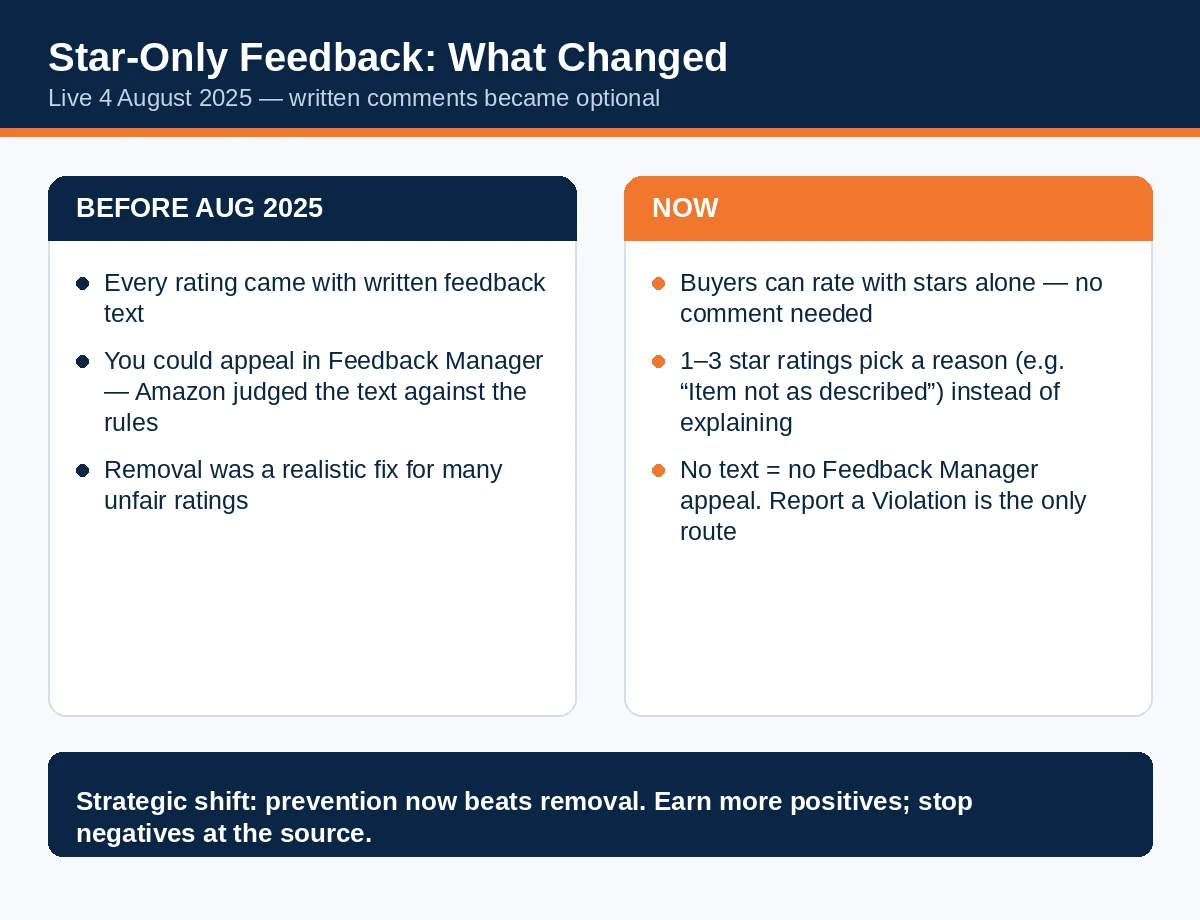
On 29 July 2025 Amazon announced a simplified feedback experience, live from 4 August 2025: leaving written feedback became optional. A buyer can now rate you with stars alone — no comment required. For low ratings (1–3 stars), the buyer must pick a reason from a list (a shipping issue, "item not as described", and so on), but that reason is a few taps, not an explanation you can work with.
Three consequences matter for your 2027 strategy:
Star-only ratings cannot be appealed in Feedback Manager. The appeal option is disabled for ratings with no text, because there is no text to judge against the feedback rules. If you believe a star-only rating genuinely violates Amazon's guidelines, the only route is Report a Violation. An unfair-but-not-abusive 1-star with no comment will, in practice, stay.
Amazon screens feedback automatically. Whether or not a rating has text, Amazon evaluates it against its community guidelines for signs of abuse. Some abusive ratings die before you ever see them — but you cannot rely on the filter, and you cannot see what it caught.
Volume cuts both ways. Amazon's stated aim was to increase rating submissions, and it has: a one-tap rating is easier to leave than a written one. More ratings mean a single negative moves your percentage less — and also that happy buyers who would never have written a word can now lift you with one tap. The sellers who benefit most from star-only feedback are the ones with the most satisfied buyers and a systematic way of asking. That is Section 4.
The strategic conclusion is the one this whole guide is built on: since August 2025, removal is a weaker tool and prevention is a stronger one. Removal still matters — Section 6 is the full playbook — but the centre of gravity has moved to earning more positives and stopping negatives at their operational source.
4. How to get more seller feedback — the compliant playbook
There is no secret channel here. Feedback volume follows order volume, delivery quality, and whether you ask — in Amazon's own ways, at the right moment. Four levers, in order of return:
Lever 1: Use the Request a Review button on every order — it asks for feedback too. The button on each order's detail page in Seller Central sends one Amazon-written email asking the buyer for both a product review and seller feedback. Because Amazon writes the words, the ask is compliant by construction, and it is the one solicitation Amazon actively wants you to use. It works once per order, between 5 and 30 days after delivery. Automating it — through a tool that triggers Amazon's official request rather than composing its own email — is allowed and, at any real volume, necessary. One ask per order, inside the window, for every buyer on the same terms: never filter the ask toward buyers you expect to be happy. That is selective solicitation, and it is manipulation under another name. (Our reviews playbook covers the button's timing and automation in full; everything there applies here, because it is the same button.)
Lever 2: Buyer-Seller Messaging — one neutral ask, used sparingly. Amazon's Communication Guidelines permit a single neutral request for a product review or seller feedback per order through Buyer-Seller Messaging, sent within 30 days of order completion, with the order ID, in the buyer's language. The risk-minimal practice — and our recommendation — is to make Request a Review your only routine ask, and use messaging for service: delivery updates that are actually necessary, and fast, genuine problem-solving. If you do send a messaging ask, the templates in the accompanying pack are drafted to the guidelines: neutral wording, no incentive, no "positive" or "5-star" language, no link off Amazon, and never on an order where the button was already used. Two asks for the same order through two channels is how sellers collect messaging restrictions.
Lever 3: Remove the causes, because feedback is an operations report. Read your negative feedback and the reasons attached to star-only lows, and they resolve into a short list: late delivery (an FBM dispatch problem), "not as described" (a listing accuracy problem), damaged in transit (a packaging problem), and slow or unhelpful replies (a service problem — Amazon expects responses to buyer messages within 24 hours, weekends included). Each is fixable at the source, and fixing it is worth more than any removal request, because it stops the next ten negatives, not the last one. FBA sellers start with an advantage here: fulfilment is Amazon's job, and feedback that is entirely about FBA fulfilment is struck through and excluded from your rating (Section 6). FBM sellers carry their own delivery risk — which makes dispatch speed and honest delivery promises their highest-value feedback work.
Lever 4: Answer every problem like the rating depends on it — because it does. When a buyer messages with a problem, solve it completely and quickly, and offer the refund or replacement the situation calls for. What you must never do is connect the solution to the feedback: no mention of changing or removing a rating, no refund offered in exchange for anything. Fix the problem because it is the job. Buyers who feel genuinely rescued sometimes update their feedback inside their 60-day window on their own initiative — that is allowed, and it is the only version of "feedback revision" that is.

Set expectations with the maths. Feedback arrives on a minority of orders — Amazon does not publish a platform-wide rate, and any precise figure a guide quotes is a guess. What is certain is the direction of the levers: more orders, systematically asked, with fewer operational failures, produces more positive feedback. That is the whole engine.
5. Examples: what good and bad feedback actually looks like
Sellers learn this system fastest from real shapes of feedback. Each example below is a composite in the style of what sellers actually receive, with the verdict Amazon's rules produce.
Example A — the misfiled product review.
"Stopped working after two weeks. The motor is weak and the plastic feels cheap. Would not buy again." — 1 star.
Verdict: removable. The entire comment is about the product; nothing in it concerns delivery, description accuracy or your service. This belongs in product reviews. Request removal on the product-review ground (Section 6) — and note the contrast with Example D.
Example B — the FBA fulfilment complaint.
"Package arrived three days late and the box was crushed. Terrible delivery." — 1 star, on an order fulfilled by Amazon.
Verdict: struck through. Where an FBA order's feedback is entirely about fulfilment or delivery, Amazon strikes the rating through, adds a note taking responsibility for the fulfilment experience, and excludes it from your feedback percentage. The text may remain visible, struck through — the score is what is protected.
Example C — the abusive one.
"This seller is a crook and an idiot, his phone is 01XXX-XXXXXX, avoid." — 1 star.
Verdict: removable, twice over. Profane/abusive language and personal information are each independent removal grounds. Quote the exact words in your request.
Example D — the mixed comment that stays.
"Seller shipped slowly, and the blender itself is underpowered." — 2 stars.
Verdict: not removable. The entire-comment rule cuts both ways: because part of this comment is genuinely about your service (slow shipping), the product-review portion does not make it removable. Your options are a public response, fixing the dispatch problem, and dilution with new positives (Section 6).
Example E — the one with no words at all.
1 star, reason selected: "Item not as described". No comment.
Verdict: stays, in practice. Since August 2025 this is the fastest-growing shape of negative feedback. There is no text to appeal, the Feedback Manager appeal is disabled, and unless it violates the guidelines (Report a Violation territory), it counts. Read it as data instead: "not as described" at volume is your listing telling you to fix its title, images or bullets — which connects straight back to listing quality work like the 75-character title rewrites.
Example F — the quiet majority.
"Arrived on time, exactly as described. Great seller." — 5 stars.
Verdict: this is the product of Section 4. Nothing about it is luck: the order was dispatched on time, the description was accurate, and the buyer was asked, once, in Amazon's own words.
The six examples at a glance:
| Example | Shape | Verdict |
|---|---|---|
| A | Product complaint only, filed as feedback | Removable — entirely a product review |
| B | Delivery complaint on an FBA order | Struck through — Amazon takes responsibility, stops counting |
| C | Abuse + personal information | Removable — two independent grounds |
| D | Product complaint mixed with a service complaint | Stays — the entire-comment rule |
| E | Star-only 1-star, no comment | Stays, in practice — no appeal route |
| F | Genuine 5-star service praise | The goal — produced by operations + one compliant ask |
Readers: the most useful thing in this article's comments will be your own examples. Paste the worst feedback you have received (anonymised — remove names and order numbers) and say whether Amazon removed it. Section 6 gives you the rules to judge each other's cases.
6. Negative feedback: what Amazon will remove, what it won't, and the exact process
Amazon removes seller feedback on four grounds, and only four. Everything else — "unfair", "the buyer is wrong", "it was one late delivery in a thousand" — is not a ground, and arguing it wastes the request.
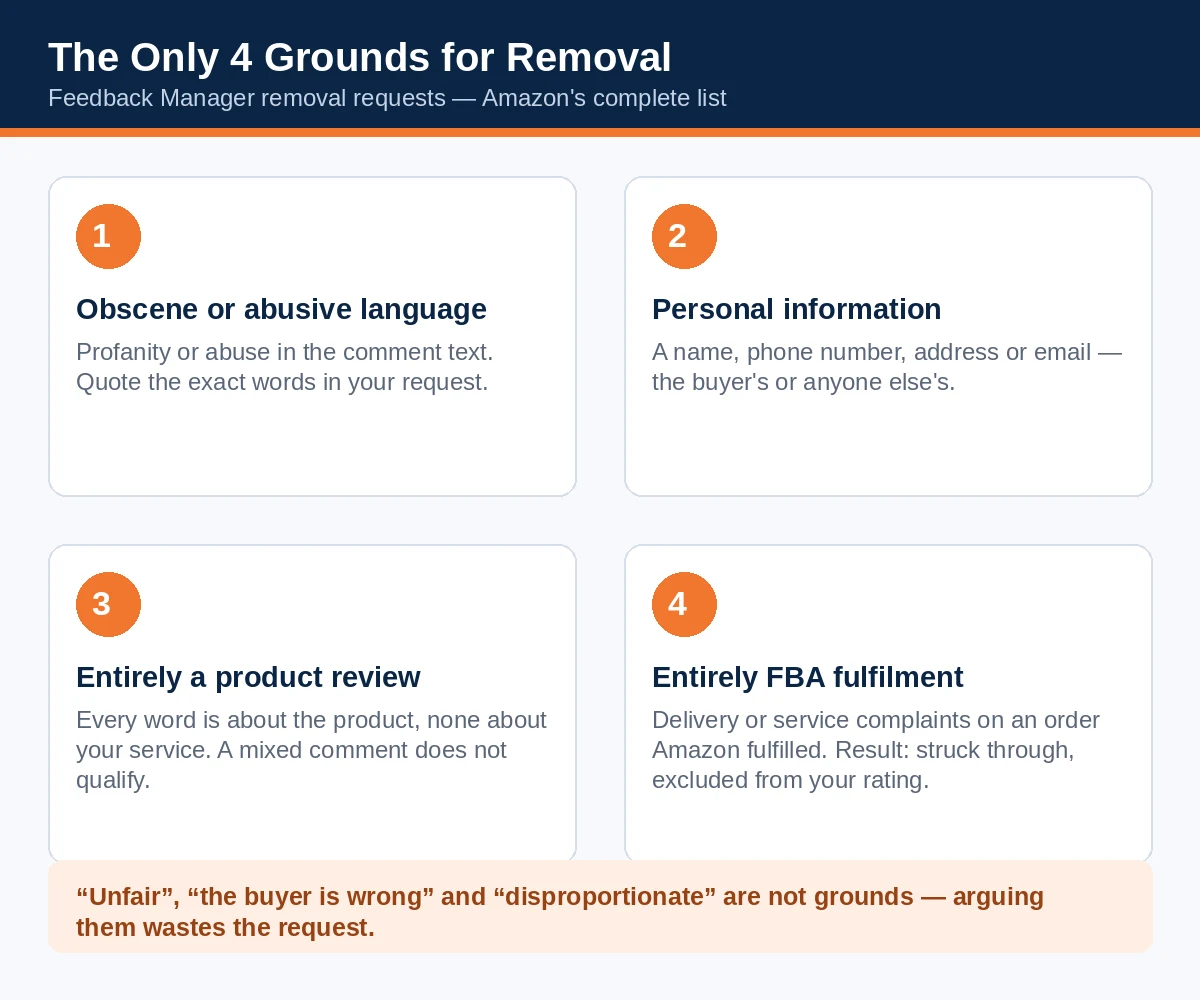
The four removal grounds:
- Obscene or abusive language in the comment.
- Personal information — the buyer's or anyone else's (names, phone numbers, addresses, emails).
- The entire comment is a product review — it speaks only about the product, not about your service, delivery or description accuracy. "Entire" is the operative word (Example D).
- The entire comment is about fulfilment or customer service on an order Amazon fulfilled (FBA). Amazon strikes this feedback through, notes that the fulfilment experience was its responsibility, and excludes it from your rating.
Not grounds: a truthful account of your own slow dispatch; a mistaken buyer whose comment is still about your service; a rating you consider disproportionate; a star-only rating with no policy violation in it.
The process, step by step:
- Go to Seller Central → Performance → Feedback and find the feedback.
- Read it against the four grounds — honestly. If none applies, skip to the fallback options below instead of filing a doomed request.
- Choose Request removal on that feedback, name the single strongest ground, and write the request like a clerk, not a plaintiff: identify the order, quote the comment, state which rule it breaks. Sample wording: "Feedback on order [order ID] is entirely a product review: '[quote]'. It makes no reference to delivery, description accuracy or our service. Please remove it from our feedback profile under the feedback guidelines."
- For a star-only rating you believe violates the guidelines, use Report a Violation instead — and accept that this path is narrower and slower.
- Track the outcome in Feedback Manager. Successful FBA-fulfilment requests show as a strike-through rather than a deletion; full removals simply disappear from your rating.
If removal is refused — your three remaining moves:
- Post a public response. Feedback Manager lets you respond publicly to a comment. Keep it short, courteous and factual: apologise for the experience, state what changed. Future buyers reading your profile judge you by the response more than the rating. Never argue, never blame the buyer, never mention policy.
- Let the buyer fix it. If the underlying problem was real and you have genuinely resolved it through normal service (Lever 4 — without ever asking), the buyer may update or remove their feedback inside their 60-day window. You may solve problems; you may not request the edit.
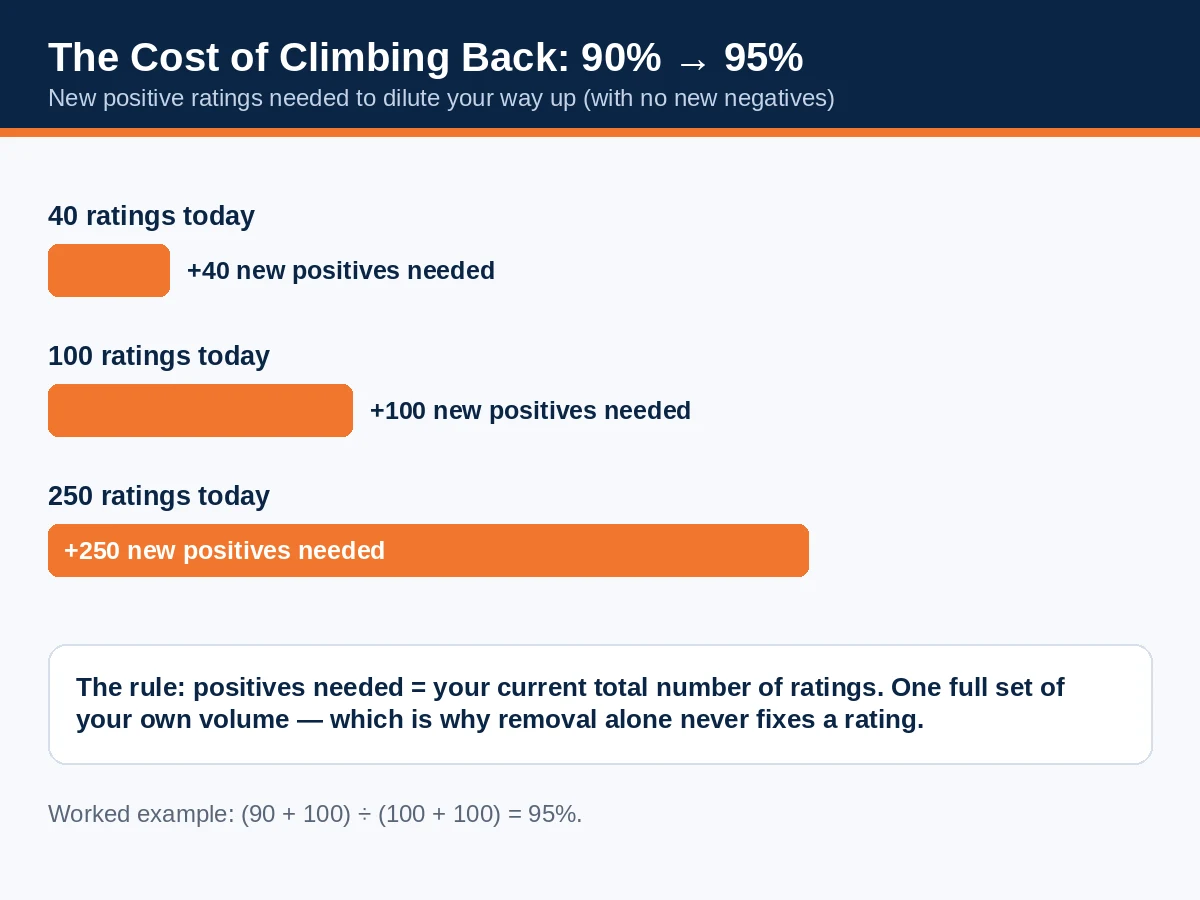
- Dilute it — and know what dilution costs. Your percentage is positives ÷ total, and recovering from a bad patch is arithmetic, not hope. Worked example: to climb from 90% to 95% positive without any new negatives, a seller with 100 ratings needs 100 new positives — as many new positives as their entire existing total (90 + 100 positives out of 100 + 100 ratings = 95%). A seller with 40 ratings at 90% needs 40. The rule of thumb: the climb costs one full set of your current volume. That is why Sections 4 and 8 matter more than this one: removal fixes the past one case at a time, while volume and operations fix the future wholesale.
One more practice rule: request removal promptly and review new negatives weekly. Old feedback is harder to act on, buyer windows close, and a weekly ten-minute Feedback Manager check is the cheapest account-health habit a seller can build.
Free download: the one-page “Can This Feedback Be Removed?” checklist walks any rating down these questions in order — print it and keep it beside your Feedback Manager routine.
7. The line you don't cross
Everything banned for product reviews has a feedback twin, and Amazon's Anti-Manipulation Policy covers feedback expressly. The specific traps in this corner of the system:
- Buying feedback. Services selling seller feedback — or "feedback packages" bundled with product testing — are selling manipulation. The 50-odd monthly searches for "buy amazon seller feedback" lead to offers that end accounts, with funds withheld. Your liability includes anything a third party you hired does on your behalf.
- Incentivised feedback. A discount, gift, refund top-up or prize offered for leaving feedback — positive or any — is an incentive, and it is banned on an insert, in a message, or on a landing page, exactly as with reviews.
- Refund-for-removal. Offering a refund in exchange for a buyer removing or changing feedback is manipulation — even if the buyer proposes the deal first. Solve the problem, refund where the problem warrants it, and let the feedback be. The sequence "refund offered, feedback mentioned" in one conversation is what enforcement reads.
- Selective asking. Asking only buyers you expect to be happy — suppressing the ask for returned orders' buyers beyond operational exclusions, screening by satisfaction signals — is gating by another name.
- Friends, family and your own accounts. Feedback from people connected to you, or left through accounts you control, is banned outright, as it is for reviews.
The penalties mirror the review side: removal of feedback, listing and account consequences up to permanent loss of selling privileges with funds withheld. No feedback score is worth an account.
8. Your feedback rating and Account Health: symptom or disease?
Feedback is best read as a diagnostic instrument. A single 1-star is weather; a pattern is climate, and patterns map to operations with unusual honesty:
| What the feedback says | What it usually means | Fix at the source |
|---|---|---|
| "Arrived late" / "slow shipping" (FBM) | Dispatch time or carrier choice is missing your promise | Same-day dispatch cut-offs, realistic handling times, a faster carrier for the affected lanes |
| "Not as described" | The listing overpromises: title, images or bullets describe a better product than ships | Rewrite the listing to match the item — including its 75-character title and Item Highlights — and reshoot any image that makes the product look better than it is |
| "Damaged / crushed" | Packaging is below the product's fragility | Upgrade packaging on the affected ASINs; for FBA, check inbound packaging requirements |
| "No reply" / "unhelpful seller" | Message response discipline | 24-hour response rota including weekends; solve in the first reply instead of bouncing questions |
| Product complaints in the feedback box | Buyers can't find (or don't trust) the review route — or the product genuinely disappoints | Removal requests for the misfiled ones; a product-quality review for the rest |

The reason to read it this way is the ODR connection from Section 2: negative feedback is one of the three defect types in your Order Defect Rate, and Amazon's target is under 1%. A seller whose dispatch is slipping does not have a feedback problem that better templates will cure — they have an operations problem that feedback is reporting, and the account-health consequences arrive through the metric, not through anyone reading the comments. Conversely, a seller with clean operations and a thin feedback count has a solicitation problem, which Section 4 solves. Diagnose first; the two diseases have different cures.
One genuinely new wrinkle for 2026–27 planning: since 31 August 2026, Amazon deactivates an individual FBM offer that breaches performance thresholds — Cancellation Rate, Late Shipment Rate, Order Defect Rate or On-Time Delivery Rate — instead of putting the whole account at risk, and it sends a warning email naming the failed metric first. Your other listings and your Account Health score are untouched. That is good news for sellers who treat feedback as an early-warning system: the sellers who read it weekly see the warning while it is still cheap — and for FBM sellers, a run of negative feedback now threatens the specific offer, which makes per-ASIN feedback patterns worth watching, not just the account average.
9. The 30-day feedback recovery plan
For a seller whose rating has already dropped — a bad batch of negatives, a fulfilment failure, a product issue now fixed — here is the month, week by week:
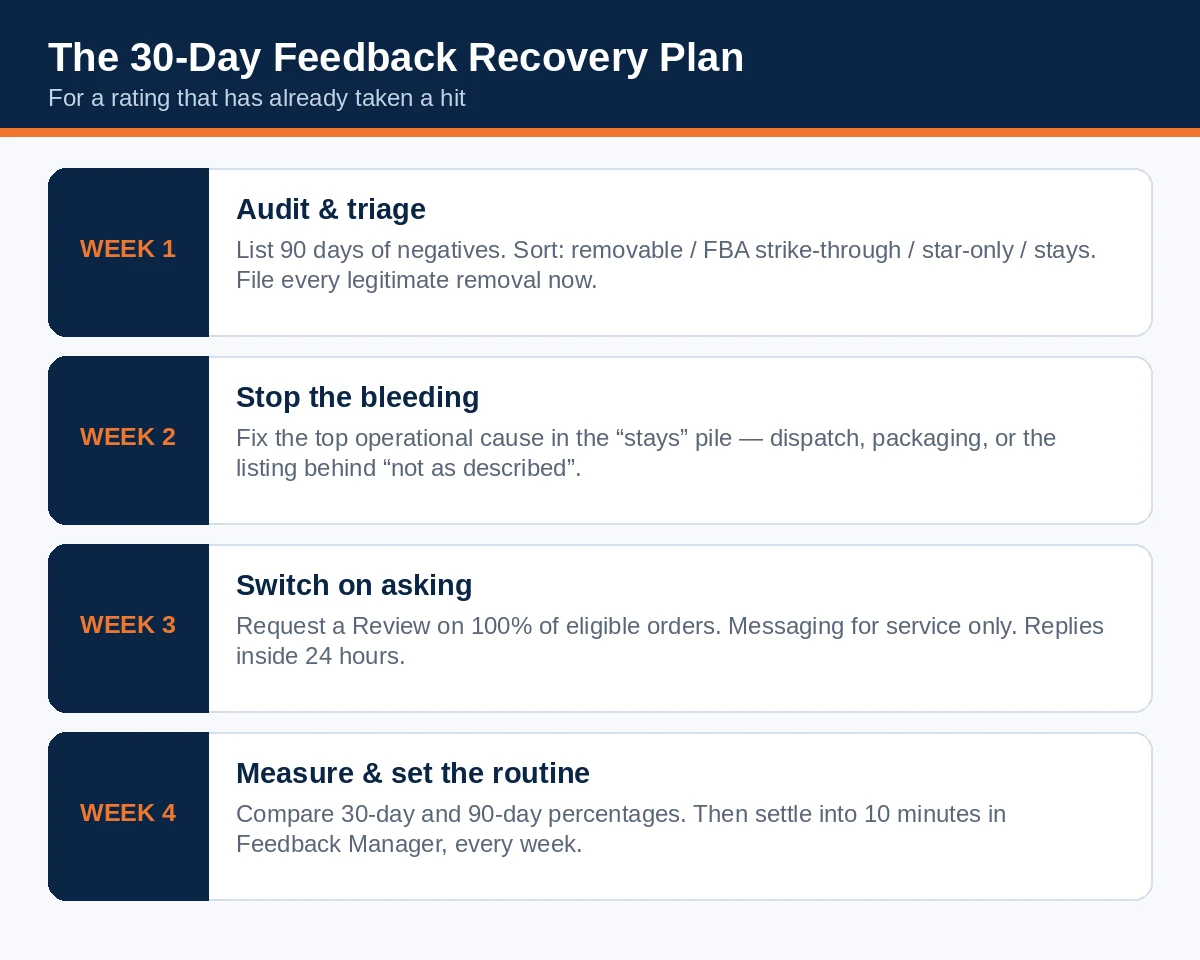
Week 1 — Audit and triage. Export or list every negative and neutral rating from the last 90 days in Feedback Manager. Sort them into four piles: removable (matches a Section 6 ground), FBA strike-through candidates, star-only (Report a Violation only if a real violation exists), and stays. File every legitimate removal request in this week, while windows are open. Post calm public responses to the text comments that will stay.
Week 2 — Stop the bleeding. From the "stays" pile, identify the top operational cause and fix it this week — dispatch, packaging, or the listing that keeps generating "not as described". A recovery plan that only asks Amazon for removals while the cause keeps producing negatives is bailing a boat with the hole open.
Week 3 — Switch on systematic asking. Request a Review active on 100% of eligible orders (automated through an official-template tool), messaging reserved for service, response times inside 24 hours. Check your template and insert wording once against Section 7's lines — recovery is not the moment to discover your insert asks for "5-star feedback".
Week 4 — Measure and set the routine. Compare your 30-day and 90-day positive percentages against Week 1. The 30-day window moves first — that is your proof the fix is working, and the number to watch while the 365-day window heals slowly behind it. Then settle into the standing routine: ten minutes in Feedback Manager every week, removal requests filed as they arise, causes logged. Recovery ends; the routine doesn't.
Set the expectation honestly for your team: the percentage recovers at the speed of new orders. The plan above cannot manufacture positives — it removes what should never have counted, stops what should never recur, and makes sure every satisfied buyer is actually asked.
10. FAQ
Does seller feedback affect the Buy Box?
Amazon does not publish that it does, directly, and no verified formula exists. Feedback is displayed beside your name when shoppers compare offers, so it influences human choices at that moment, and negative feedback feeds your Order Defect Rate, which is an account-health metric with a target under 1%. Anyone quoting you an exact Buy Box weight for feedback is guessing.
Can Amazon remove a negative feedback automatically?
Partly. Amazon screens all feedback against its community guidelines for abuse, whether or not it has text. FBA-fulfilment feedback that qualifies is struck through when identified through the removal process. Beyond that, removal happens when you request it on one of the four grounds — so the weekly Feedback Manager check matters.
How long does seller feedback stay on my profile?
Ratings count in your 30 / 90 / 365-day and lifetime windows, so a negative's effect on the displayed percentage fades as the shorter windows roll past it. The rating itself remains part of your lifetime record, which is why the lifetime percentage moves slowly in both directions.
Can a buyer change or remove their feedback?
Yes — buyers can update or remove their own feedback within 60 days of posting it. You may resolve their problem completely; you may never ask them to make the change, or link the resolution to it.
Why can't I appeal a star-only rating?
Since 4 August 2025, written comments have been optional, and the Feedback Manager appeal works by judging comment text against the rules. With no text there is nothing to judge, so the appeal is disabled. Report a Violation remains available for ratings that genuinely break the guidelines.
Is asking for seller feedback allowed at all?
Yes — asking is allowed, in Amazon's channels and Amazon's way: the Request a Review button (which asks for feedback and a product review together), or one neutral Buyer-Seller Messaging request per order under the Communication Guidelines. What is banned is incentivising feedback, asking only for positive feedback, asking only happy buyers, or buying it.
How often should I check Feedback Manager?
Weekly — ten minutes is enough. New negatives are easiest to act on while the buyer's 60-day update window is open and the order details are fresh, and a weekly glance is how you spot an operational pattern (three "arrived late" ratings in a row) before it becomes an ODR problem. Put it on the same recurring slot as your Account Health check.
My feedback is mostly about my product, not my service. Is that good or bad?
Both. Misfiled product complaints that make up the entire comment are removable — free rating repair. But a steady stream of them is also market research you did not have to pay for: buyers are telling you, in the wrong box, what they think of the product. Remove the ratings; keep the lesson.
Over to you: what is the most unfair feedback you have ever received?
Every seller has one — the 1-star for a courier's snow day, the product review filed against the seller, the single word "bad" with no order problem anyone can find. Tell us yours using our contact form: what it said, which of the four grounds (if any) it matched, and whether Amazon removed it. If yours is still sitting there, say so — between the removal rules above and a few hundred fellow sellers reading, you may finally get the answer Amazon's first reply didn't give you.
And if your rating is in recovery, report back in a month with your 30-day percentage. The before-and-after numbers are the most useful thing this community can publish.
Read next: your product's other reputation system is covered in our companion guide, How to Get Reviews on Amazon in 2027: The Complete TOS-Safe Playbook — Vine, Request a Review, inserts and the law, in full. And if your titles still run over 75 characters, fix them before Amazon's AI does: Amazon's 75-Character Title Rule (2027 Guide).